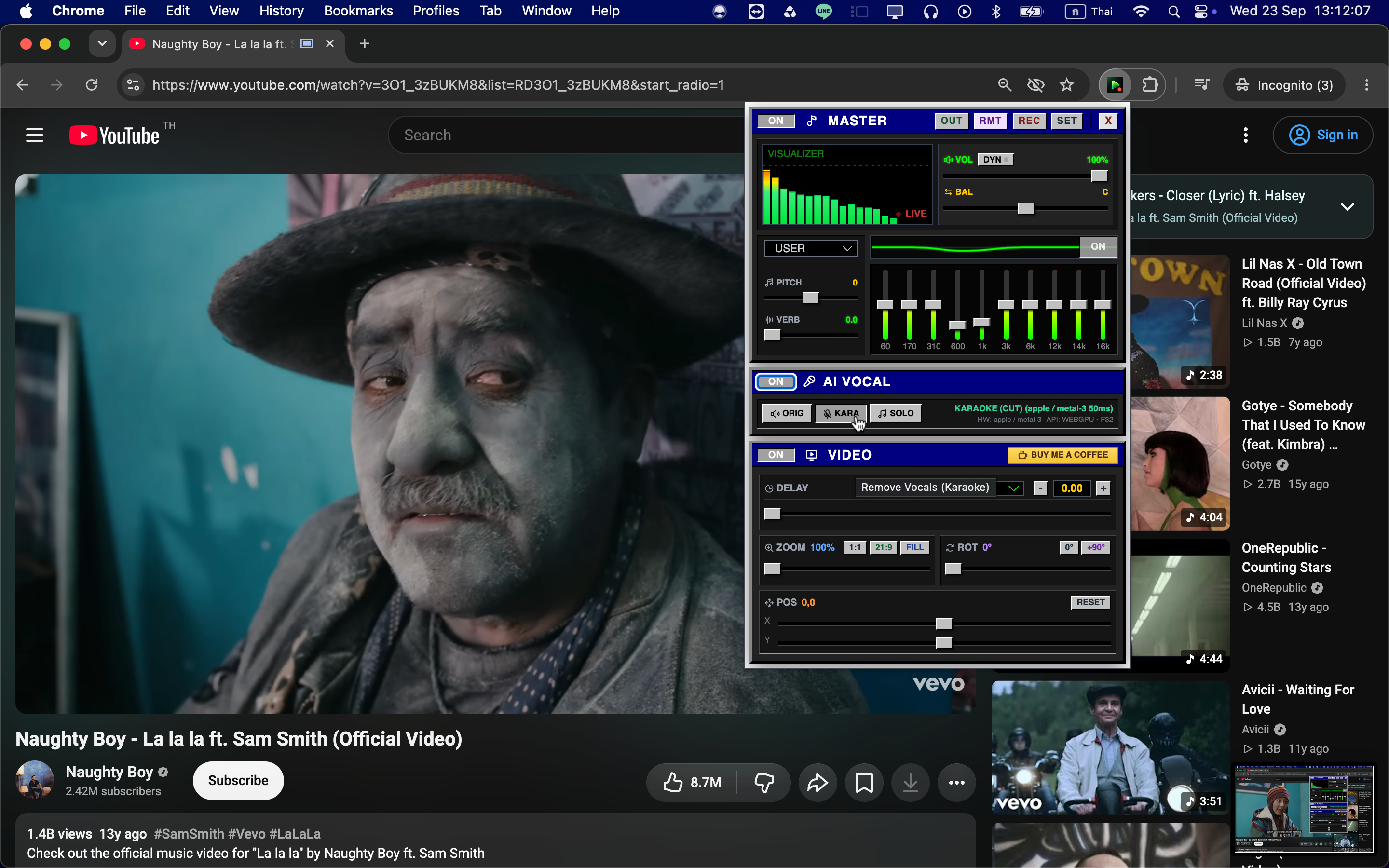

Hi everyone. I’m the developer behind NextSona, and I built the extension myself.
NextSona is a Chrome extension for pitch shifting, AI vocal removal, EQ, and video sync. I wanted these controls to stay close to the music instead of making me move every track into a separate audio editor.
Sometimes you only need to lower a song by a few semitones, reduce the original vocal for karaoke, or fix a small audio/video delay. Opening three different tools for that felt like overkill, so I built one browser-based workflow for it.
At the moment, NextSona includes:
- Pitch shifting for changing the key of browser audio
- A 10-band EQ, volume, balance, reverb, and dynamics controls
- AI Vocal modes: Karaoke to reduce the lead vocal, and Acapella to focus on the vocal part
- Local recording with playback, export, and delete controls
- Video delay, zoom, rotation, and position controls for syncing audio and video
- An optional remote controller for changing settings from another device
It is mainly intended for singers, musicians, karaoke users, and anyone who wants a little more control over browser audio. Think of it as a small practice desk hiding in the Chrome toolbar.
Audio processing happens locally in the browser during normal use. The audio stream is not uploaded to NextFeeder Labs for processing. The remote feature sends control data for the session, not the audio stream.
The honest part: AI vocal separation is not magic. Results depend on the song mix, source quality, browser, device, and available hardware acceleration. Some songs sound surprisingly good; others remind me that audio engineering is still allowed to be difficult.
NextSona is designed for compatible music and video tabs in Chromium-based browsers, so it will not behave identically on every website. Recording should only be used for audio or video that you own or are authorized to record.
The current version is 1.1.0. I’m sharing it because I’d genuinely like feedback on pitch-shifting quality, AI Vocal results, supported websites, and any controls that feel confusing.
Chrome Web Store: https://chromewebstore.google.com/detail/nextsona-pitch-shifter-eq/jghfpkhbcmcbmecbogofjlombgijfbon
I made this as a personal project, so constructive criticism is very welcome. If you try it, I’d love to know what works, what does not, and which feature you would actually use more than once.