

If you're starting your journey in SEO or website development, Google Search Console (GSC) is one of the most essential tools to understand. In this article, we'll cover what GSC is, how it works, why it's important, and how to use it. Especially when dealing with different platforms like Shopify, WordPress, and Blogger.
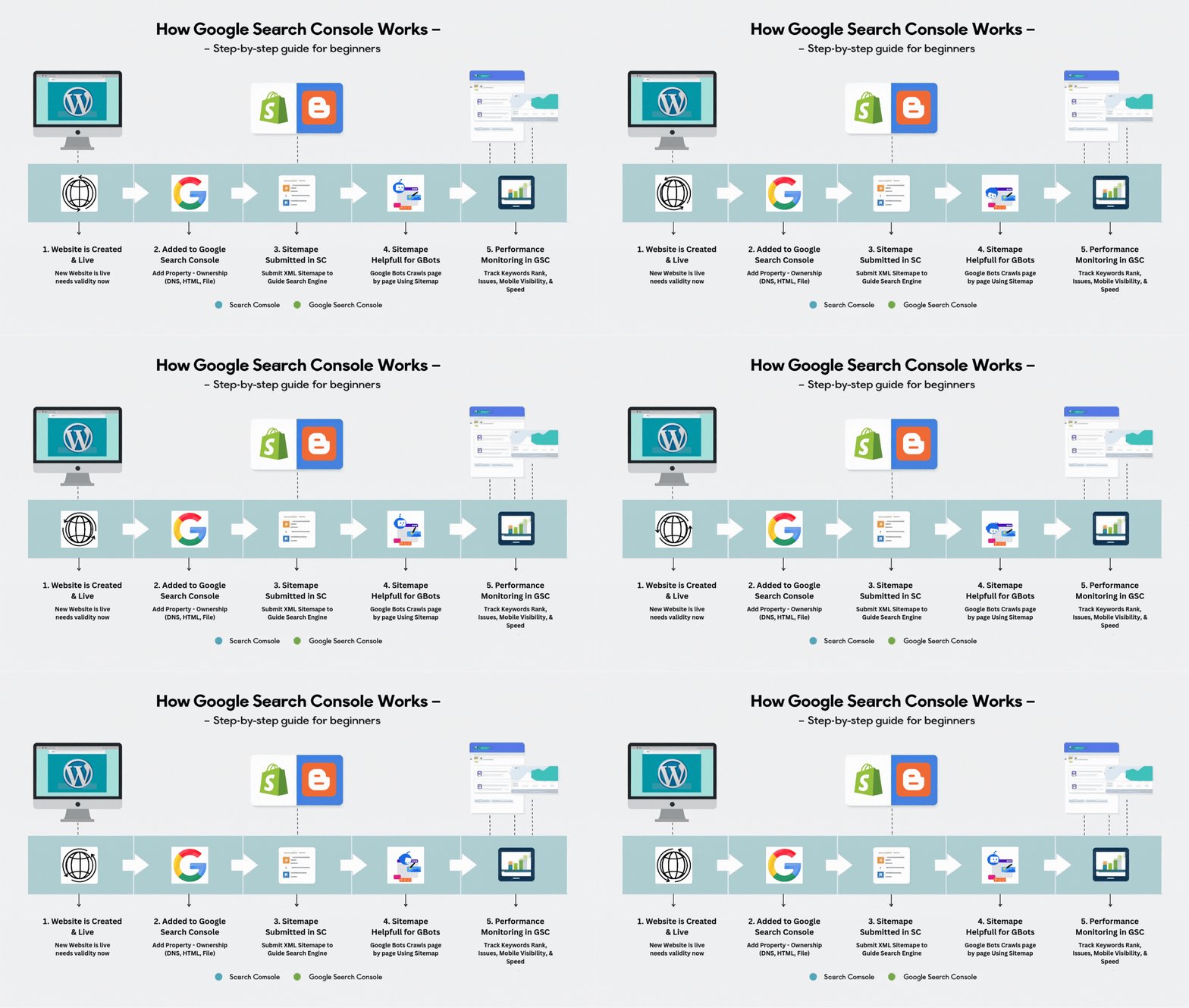
What is Google Search Console?
Google Search Console (GSC) is a free tool offered by Google that helps website owners, developers, and SEO professionals monitor, maintain, and troubleshoot their website’s presence in Google Search results. It provides valuable insights into how Google views your website and helps you optimize your site’s performance.
Definition of a Search Console
A Search Console is a toolset provided by a search engine to allow webmasters to manage and improve their website's visibility in that search engine’s search results. For example:
Google offers Google Search Console
Bing offers Bing Webmaster Tools
Yandex offers Yandex.Webmaster
So, each major search engine typically provides its own version of a search console.
What is the Role of Google Search Console?
The main functions of Google Search Console include:
Monitoring search traffic and website performance
Identifying indexing issues
Tracking keyword rankings
Submitting sitemaps
Checking mobile usability
Resolving security issues, like malware or hacking
Understanding which pages are performing well
It plays a critical role in search engine optimization (SEO) by allowing you to make informed decisions backed by real data.
How Google Search Console Works
GSC works by connecting your website to Google through a verification process. Once verified, Google begins collecting data from your site, including:
Clicks, impressions, and position in search results
Indexing status of your pages
Issues with crawling or mobile usability
External and internal links to your website
This data allows you to analyze, optimize, and troubleshoot your website for better search visibility.
Why Do We Use Google Search Console?
We use Google Search Console not just to monitor performance, but also to:
Tell Google our website exists — If you have a brand new website, Google may not discover it quickly. By adding it to GSC, you're telling Google that your website is live and ready to be indexed.
Submit a sitemap — The sitemap acts as a guide or blueprint for search engine bots. It helps them understand your website’s structure—like a navigation map that leads them from page to page.
Help bots crawl more efficiently — Search engine bots use the sitemap to crawl your pages in an organized way, reducing chances of missing important content.
Track keyword rankings, impressions, and click-through rates (CTR)
Fix indexing or crawling errors
Monitor mobile usability and Core Web Vitals
Detect and remove malware or spam issues
Improve your overall SEO performance
We use GSC because it:
Helps us understand how Google sees our site
Allows us to fix indexing problems
Provides performance data for SEO improvements
Identifies potential penalties or security threats
Tracks how well our site is performing in search engines
It’s an essential tool for improving search rankings, fixing site issues, and ensuring your content is visible to users.
How to Add a Website in Google Search Console
Adding your site to GSC is simple and takes just a few minutes:
✅ Step 1: Go to Google Search Console
Write on Google Search Console Keyword at search engine URL Bar Or Click on link Given Below
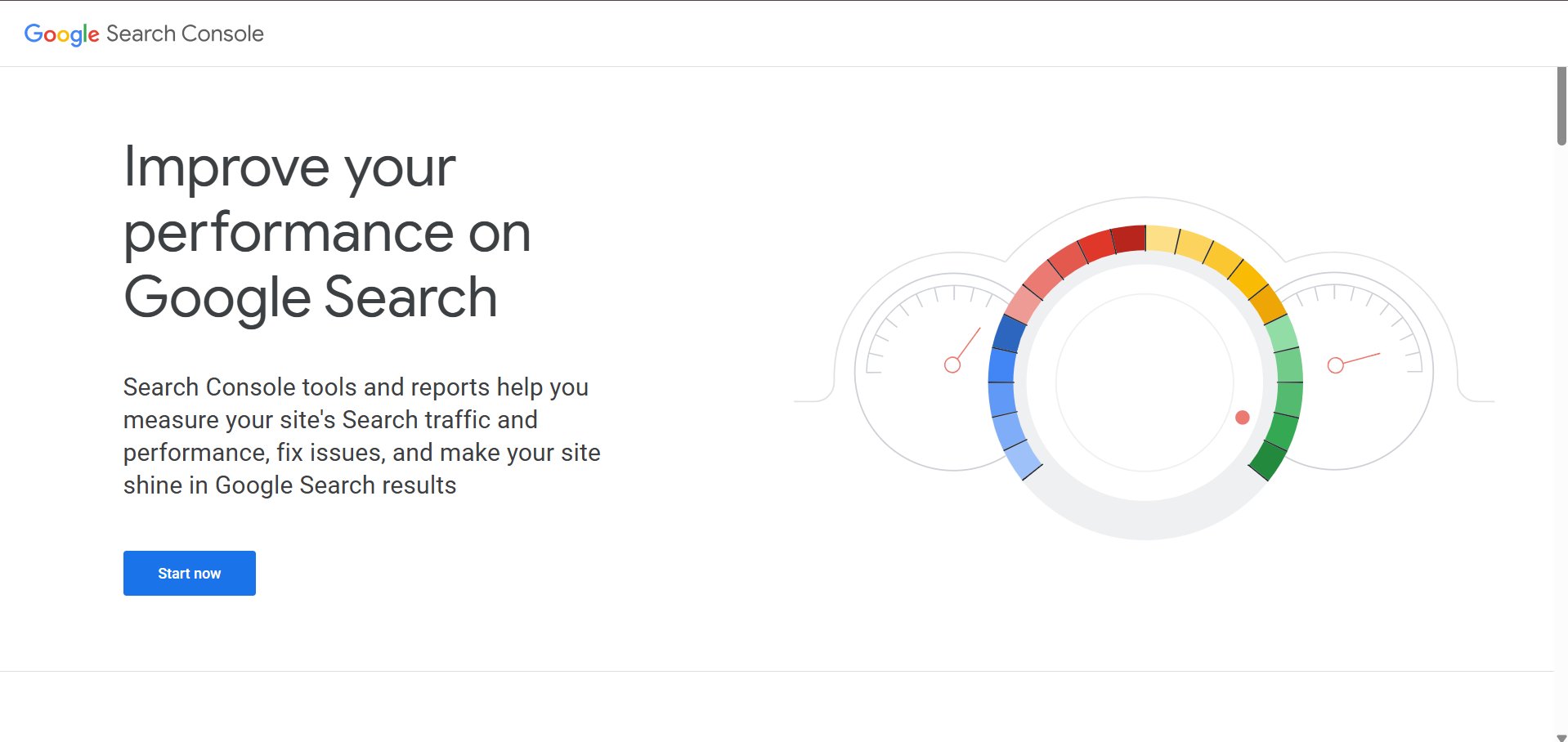
Now Click on Start Now
✅ Step 2: Click on “Add Property”
You’ll see two options:
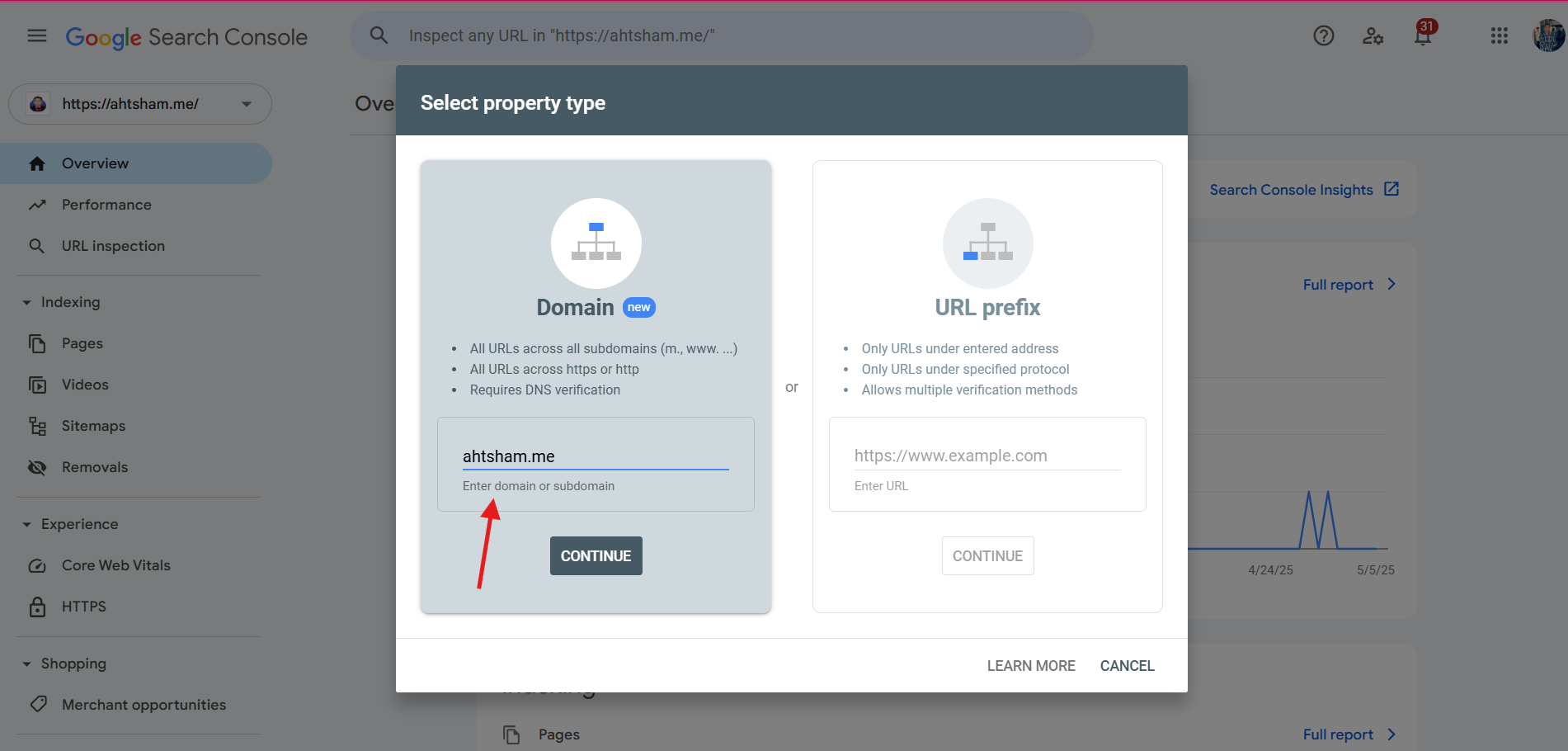
Domain (Recommended for full domain tracking – e.g., all protocols and subdomains)
URL Prefix (For a specific URL – e.g., https://yourdomain.com)
Choose Domain if possible.
✅ Step 3: Verify Ownership
Choose a verification method:
DNS Verification (Recommended for Domain property)
→ Add a TXT record in your domain's DNS settings
(e.g., via GoDaddy, Namecheap, Cloudflare, etc.)HTML File Upload (For URL prefix)
→ Download and upload the file to your root directoryHTML Tag
→ Add a<meta>tag in your website’s<head>Google Analytics / Google Tag Manager
→ If already installed, GSC can verify through them.
Once verified, Google will begin collecting data for your website.
What is a Sitemap in SEO?
A sitemap is a file that provides information about the pages, videos, and other files on your site, and the relationships between them. Search engines like Google use sitemaps to better crawl your site.
Types of Sitemaps
There are mainly two types:
XML Sitemaps – For search engines (SEO-focused)
HTML Sitemaps – For users (navigation-focused)
Common Sitemap Formats
Sitemaps can come in various formats:
.xml(most commonly used).html.txt.rssor.atom
The most widely accepted format for SEO is XML.
How to Build and Submit a Sitemap
Step 1: Generate Your Sitemap
You can generate a sitemap using:
Plugins (Yoast SEO for WordPress)
Online tools (XML-sitemaps.com)
CMS built-in features (Shopify, Blogger)
Step 2: Submit the Sitemap in Google Search Console
Open Google Search Console
Select your website
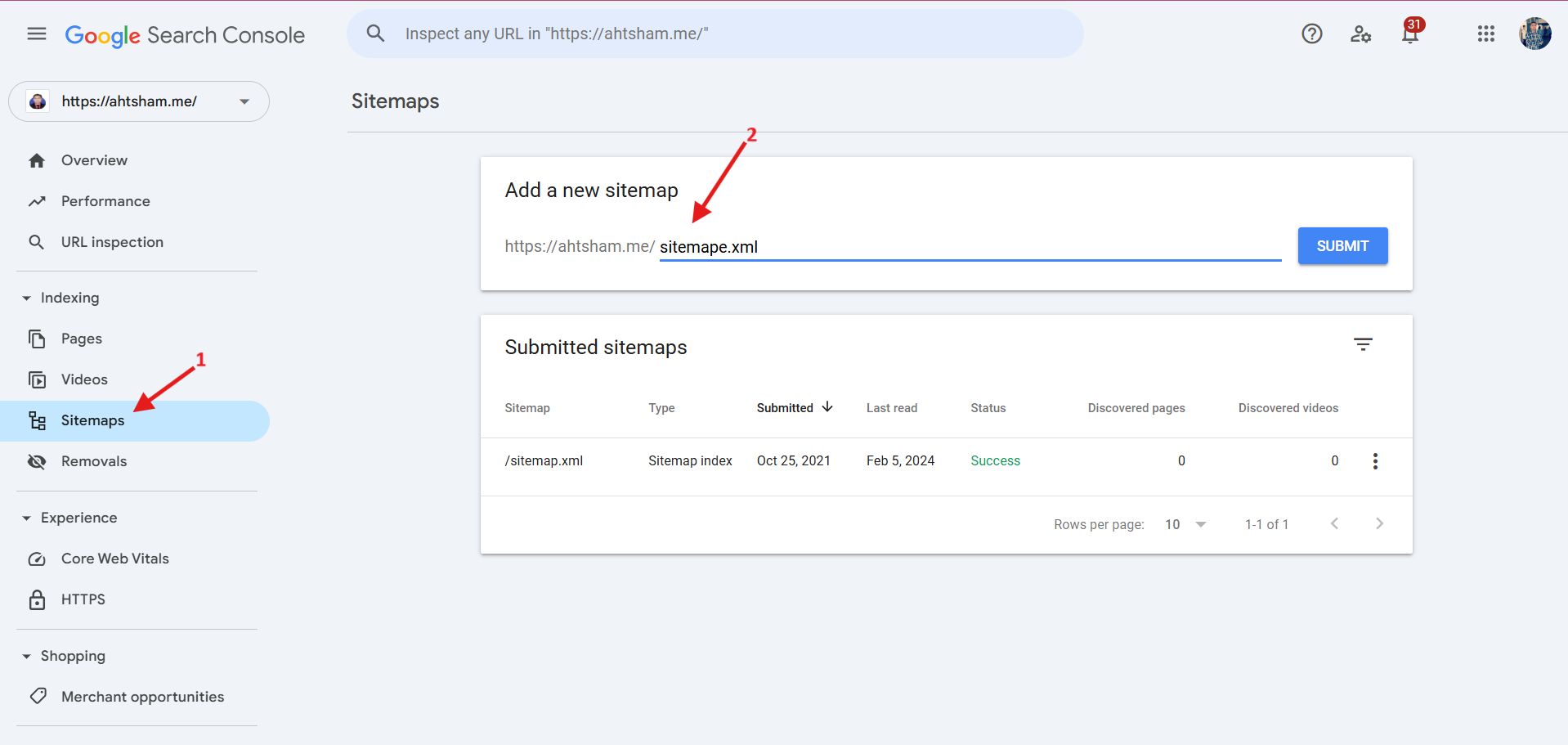
Go to “Sitemaps” in the left menu
Enter the URL of your sitemap (e.g.,
https://yourdomain.com/sitemap.xml)Click Submit
Sitemap Submissions for Different CMS Platforms
Shopify
Shopify auto-generates your sitemap at
yourdomain.com/sitemap.xmlSubmit it directly in GSC—no plugin needed
WordPress
Use SEO plugins like Yoast SEO or All in One SEO to create sitemaps
Your sitemap is usually found at
yourdomain.com/sitemap_index.xml
Google Blogspot (Blogger)
Blogger has a basic sitemap:
yourdomain.blogspot.com/sitemap.xmlOr you can use:
feeds/posts/default?orderby=updatedsitemap.xml?page=1and so on for paginated blogs
Final Thoughts
Google Search Console is a must-have tool for anyone managing a website. Whether you’re an SEO beginner or a professional, using GSC to monitor, optimize, and grow your site’s performance in Google Search is non-negotiable.