

Switching Blocks Minigame Script for Unity
€12
3 Personen haben dies gekauft
What it can do?
The script allows you to create a simple, yet engaging minigame where groups of blocks (A and B) alternate visibility based on a timer. Players can enjoy:
- Smooth transitions between block groups with visual and audio feedback 🎵🎨
- Dynamic gameplay that adapts as the game progresses 📈
- Full customization for block groups, materials, intervals, and sounds 🛠️
Features:
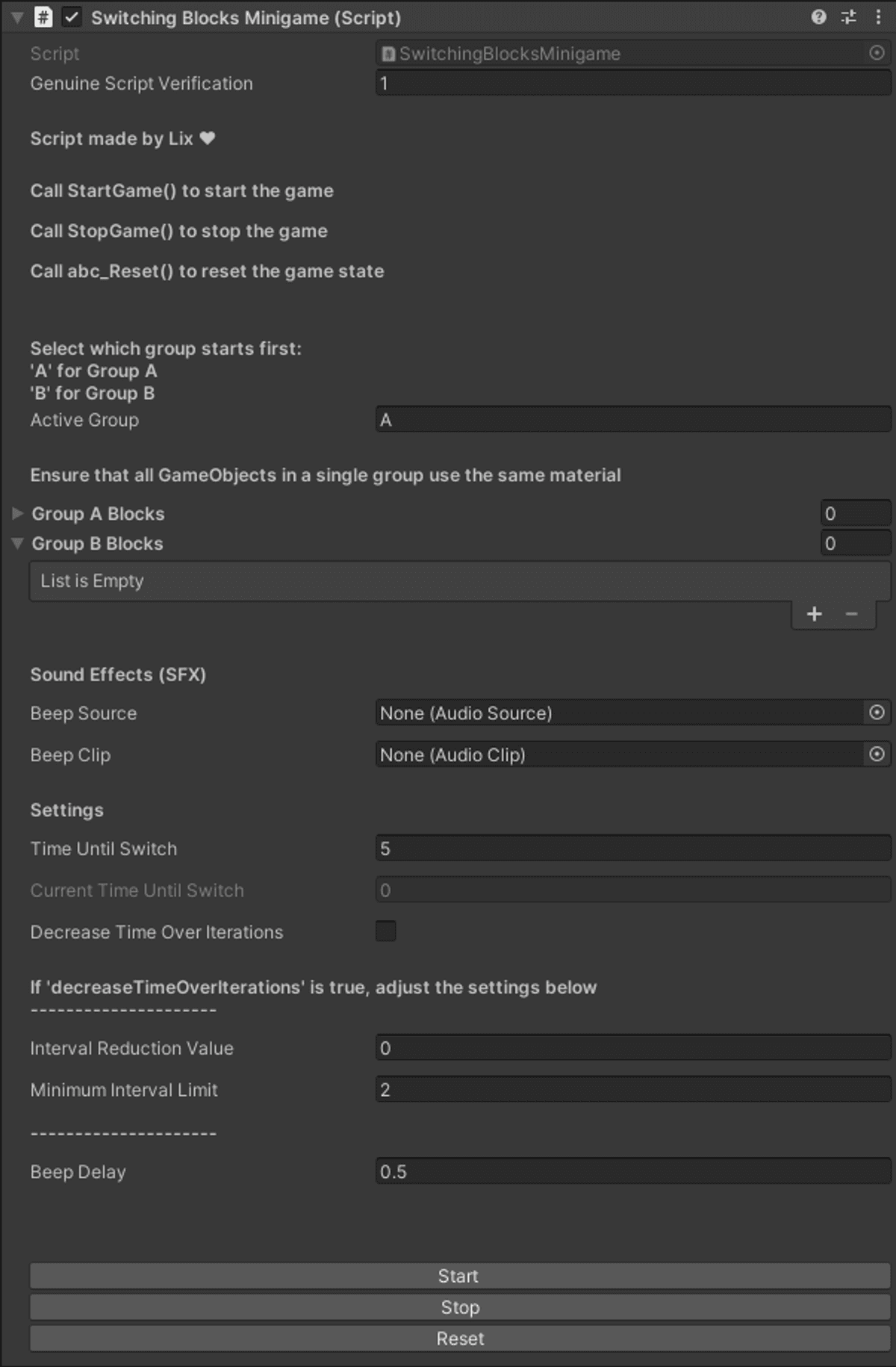
- Customizability: Adjust settings like intervals, active groups, and visual styles in the Unity Inspector.
- Sound Effects: Includes seamless integration of audio feedback during transitions.
- Simple API: Just call StartGame(), StopGame(), or abc_Reset() to control the game.
- Inspector Buttons: Quickly test gameplay with custom buttons in the editor.
- Dynamic Gameplay: Enable interval reduction to make the game more challenging over time.
- No Coding Required: Set it up entirely through the Unity editor!
How to Use the Script:
- Drag and drop the script onto a GameObject in your Unity project.
- Assign block groups, materials, and sound effects.
- Customize gameplay settings, and you're ready to go.
€12
3 Personen haben dies gekauft
Gib einen fairen Preis ein
€
€12