

A few months ago I shipped what I called the biggest update Spotify Dedup had ever seen. Today I'm shipping the other biggest update, the single feature you've been asking for since the project launched.
Spotify Dedup can now find duplicates across multiple playlists.
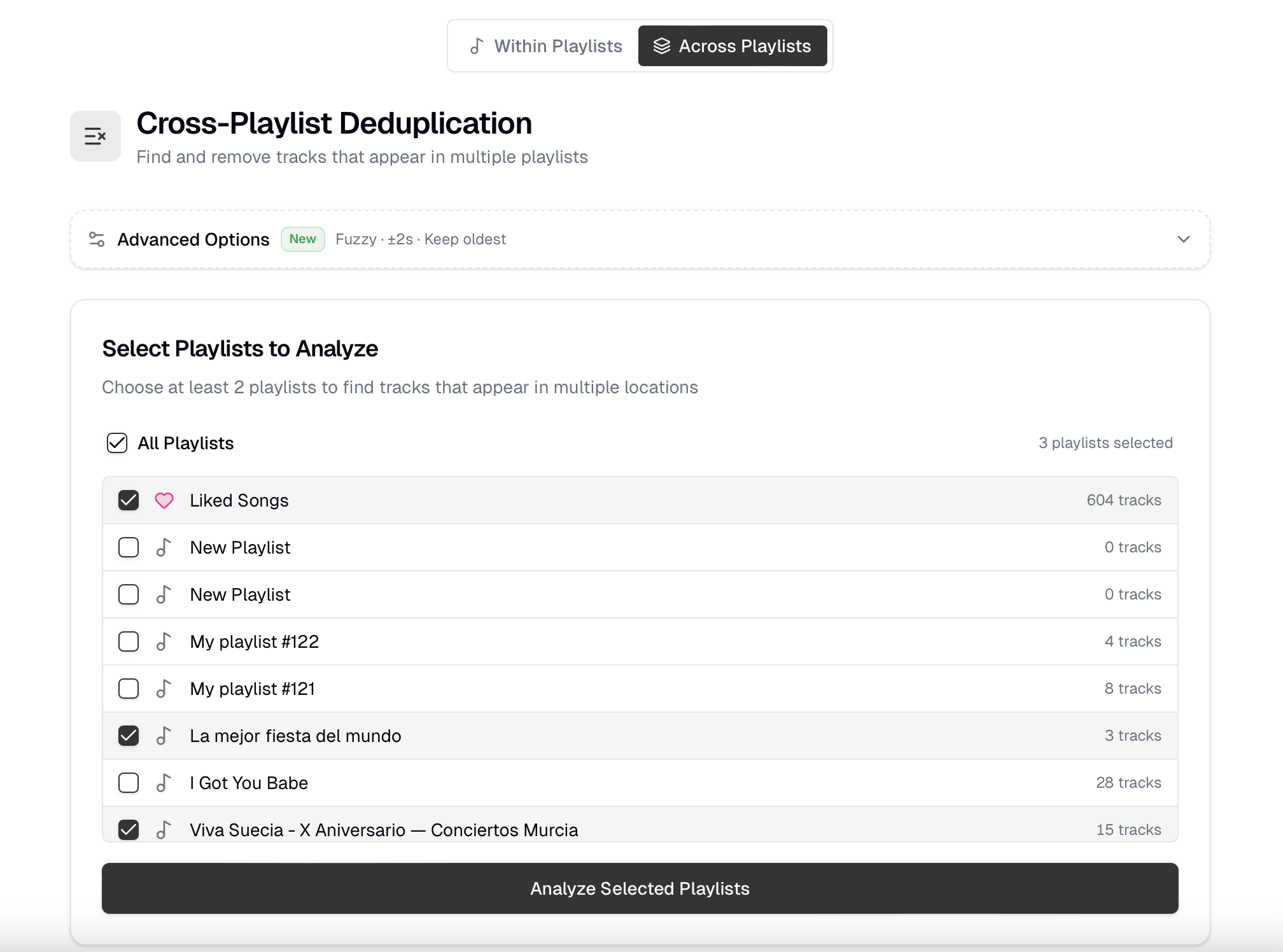
Pick a handful of your playlists (or your Liked Songs!), hit Analyze, and Dedup will surface every song that lives in more than one of them. For each match you decide which playlist keeps the song, and the rest get cleaned up in one click.
This is the single most-requested feature in the project's history. It's been on the issue tracker for years. It's the gap the FAQ has openly admitted to for almost as long ("This tool can identify and delete duplicates on all playlists in a library, but doesn't detect duplicates of a song across multiple playlists"). It's one of the most upvoted requests on Spotify's own Idea Exchange. I've been promising "one day" for as long as I can remember.
That day is today.
How it works
Hit the toggle in the header to switch from Within Playlists to Across Playlists. From there it's three steps:
- Pick the playlists you want to scan. Multi-select with checkboxes, include your Liked Songs in the mix, or use Select all if you want to go nuclear on your whole library at once.
- Click Analyze. Dedup surfaces every song that appears in 2+ of the selected playlists.
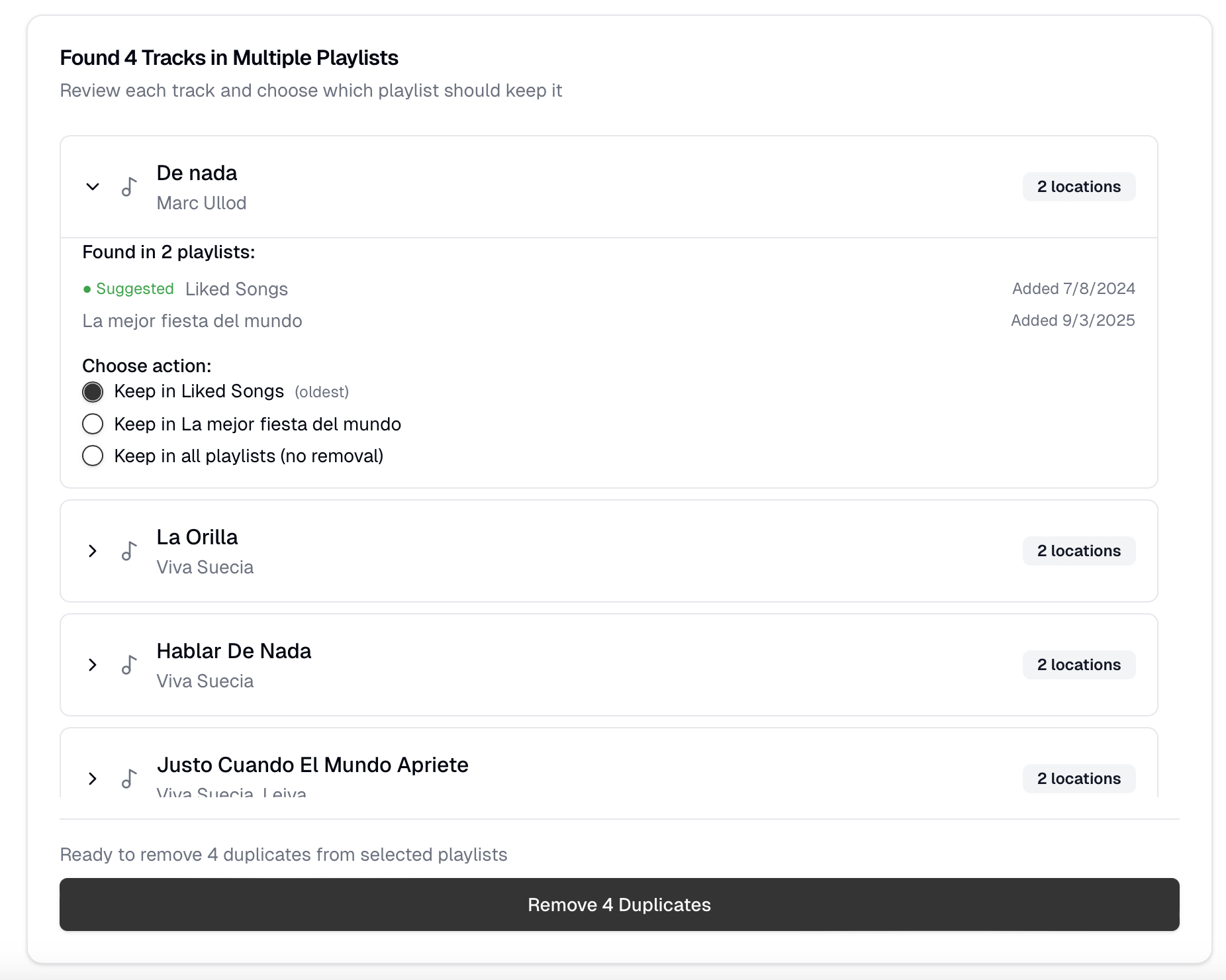
- Decide what to keep. Each match shows you where the song lives, in which playlist, and when it was added. Pick the one you want to keep, or hit Keep all copies if it's a song you genuinely want everywhere.
When you're happy with your choices, one button removes everything else. Done.
Same brain, more reach
The matching engine from the last update powers this too. Whatever you've configured under Advanced Options drives the across-playlist analysis:
- Strict matching catches only same-Spotify-ID duplicates. Perfect when you want to keep the studio version and the remaster.
- Fuzzy matching catches the harder case: same title, same artist, near-identical duration. The seven copies of "Bohemian Rhapsody" Spotify has scattered across re-releases, deluxe editions, and "Greatest Hits" compilations? Dedup finds them all.
- Keep oldest vs Keep newest decides which copy gets pre-selected as the keeper for every cluster. Flip the toggle and the suggestion list updates live.
Safety first (always)
A single misclick that wipes the same song from 20 playlists would be a very bad day. The flow is built around that:
- Per-cluster review. No bulk-delete-everything button. You see every match, you choose, and only then does anything get removed.
- A Keep all escape hatch on every cluster. Don't want to lose any copy of a particular song? One radio button keeps it everywhere it currently lives.
- Honest partial-failure reporting. If Spotify rejects one of the playlists mid-batch (it happens, rate limits, snapshot mismatches, transient 5xx) the toast tells you exactly how many succeeded and how many didn't, instead of pretending it all worked.
- Edge-case guards. Local files (spotify:local:*) are skipped — they have volatile URIs and removing them via the API can corrupt mobile sync. Geo-blocked entries with no metadata are skipped too, so they don't false-cluster against each other.
A bit of polish along the way
- Locale-aware counts. Every duplicate count now formats with the right thousands separator for your language: 6,289 in English, 6.289 in Spanish, 6 289 in French. Small thing, big difference.
- Dismissible support card. If you've already donated (thank you!) the "Support the project" card on the dedup page is now closeable, and stays gone for 30 days.
- Within-Playlists mode is unchanged. If across-playlist dedup isn't your thing, every existing flow works exactly like before. Same UI, same buttons, same behavior.
Why did this take so long?
Honestly? Three reasons.
The first is that the API surface is genuinely tricky. Spotify's playlist endpoints behave differently when you span playlists, every playlist is a separate request, every request can fail independently, and there's no documented "remove this track from these N playlists in one shot."
The second is that the safety bar is much higher. With within-playlist dedup, the worst case is "I lost a duplicate I wanted to keep." With cross-playlist dedup, the worst case is "I lost a song from the playlist I cared about most." That asymmetry has to be reflected in every part of the UX review screens, confirmation patterns, error reporting — and it took several iterations to get right.
The third, and I'll be honest, is that I kept underestimating the work. The clustering algorithm itself was fast. The right UI shape, the right safety nets, localization across 11 languages, the test coverage that gives me confidence to actually ship: all of it took longer than I expected. I'd rather get it right than get it out.
Thank you
This project stays free, and updates like this only happen because of the people who chip in to support it. Every coffee, every kind email, every GitHub issue with a clear repro: all of it matters. You know who you are - thank you!
As always, keep the feedback coming so I can keep making the tool better.
Use the new Spotify Dedup (https://spotify-dedup.com/)
Happy listening 🎧