
Abstract
The modern software landscape demands applications that are not only visually consistent across multiple platforms (iOS, Android, Windows, macOS) but also intelligent, adaptive, and capable of understanding complex user needs. This white paper explores the powerful synergy between .NET Multi-platform App UI (.NET MAUI) and Artificial Intelligence (AI). We detail how developers can utilize the unified framework of .NET MAUI to build robust, high-performance cross-platform frontends, while integrating sophisticated AI capabilities—ranging from on-device machine learning to cloud-based NLP services—to create truly next-generation user experiences. This combination accelerates development cycles, reduces platform-specific overhead, and positions organizations at the forefront of digital innovation.
1. Introduction: The Convergence Imperative
1.1 The Challenge Landscape
Historically, building a modern application required maintaining separate codebases for each target platform (e.g., Swift/Kotlin for mobile, C#/.NET for desktop). This approach leads to:
Development Overhead: Increased time-to-market and maintenance costs.
Inconsistency: Potential for feature parity gaps between platforms.
Feature Lag: Difficulty in rapidly adopting new OS features or AI models across all targets simultaneously.
1.2 The Solution Pillars
This paper addresses these challenges by focusing on two complementary technologies:
.NET MAUI (Multi-platform App UI): Microsoft's evolution of Xamarin, providing a single C# codebase to deploy native applications across iOS, Android, Windows, and macOS. It offers a unified development experience while compiling to platform-native UIs.
Artificial Intelligence (AI): The integration of machine learning models, natural language processing (NLP), computer vision, and predictive analytics into the application logic to enhance functionality beyond simple CRUD operations.
1.3 Goal of the White Paper
To provide a comprehensive technical roadmap detailing how and why combining .NET MAUI with AI services results in superior, efficient, and future-proof enterprise applications.
2. Understanding the Components
2.1 Deep Dive into .NET MAUI
.NET MAUI is built on the principle of "Write Once, Run Anywhere (NATIVE)".
Unified Codebase: Developers write business logic in C# and XAML/C#, targeting a single project structure.
Platform Abstraction: The framework handles the necessary platform-specific rendering and API calls, abstracting away much of the native boilerplate code.
Modern UI Toolkit: It supports modern design patterns and bindings crucial for creating rich user interfaces that feel inherently native on each OS.
Key Benefit: Developers focus 90% of their effort on what the app does (the logic) rather than how it renders differently on iOS vs. Android.
2.2 The Spectrum of AI Integration
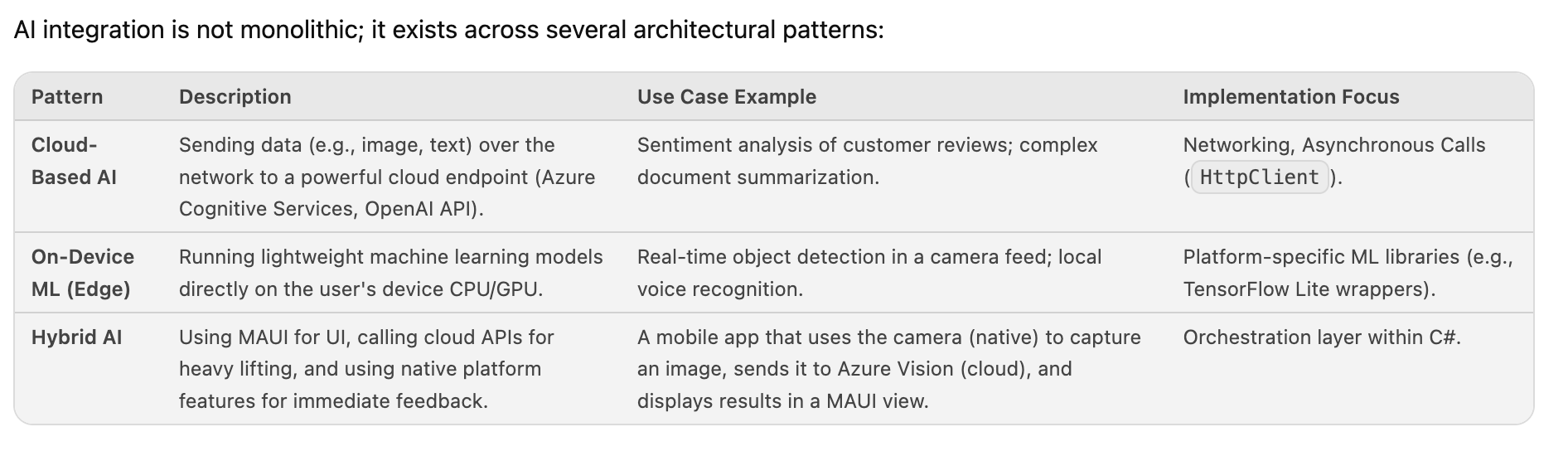
AI integration is not monolithic; it exists across several architectural patterns:
3. Architectural Integration: Connecting MAUI to AI Services
The core challenge is making the asynchronous, often complex, nature of AI services feel seamless within the structured environment of a cross-platform UI framework.
3.1 The Service Layer Pattern (Best Practice)
We strongly recommend implementing an Abstraction/Service Layer pattern in C#. This layer acts as the mediator between the ViewModels (which drive the MAUI UI) and the external AI services.
Workflow:
View Model (MAUI): A user action triggers a method call, e.g., await _aiService.AnalyzeImageAsync(imageFile);.
AI Service Implementation: The service checks its configuration:If Cloud-based: It constructs the HTTP request and calls Azure/OpenAI SDKs.If On-Device: It initializes the platform-specific ML runtime wrapper (e.g., using MAUI's ability to access native APIs).
Result Handling: The service receives the structured data (JSON, etc.) and maps it back into a clean C# object model that the ViewModel can easily consume and bind to the UI.
3.2 Implementing On-Device ML in MAUI
While .NET MAUI abstracts much of the platform difference, accessing low-level hardware features like the camera or running optimized ML models requires careful handling:
Platform Specific Handlers: For true edge computing, developers may need to utilize MAUI's ability to write platform-specific code (e.g., writing a custom Android CameraX wrapper or iOS CoreML integration) and expose that functionality through an interface implemented in C#.
P/Invoke & Interop: In advanced scenarios, Platform Invoke (P/Invoke) might be necessary to call highly optimized native libraries (.dlls or .frameworks) that handle the ML inference.
3.3 Handling Asynchronicity and State Management
AI operations are inherently asynchronous and can have variable latency. MAUI's MVVM pattern is perfectly suited for this:
ICommand Binding: AI actions should be bound to ICommand properties in the ViewModel.
Loading States: The ViewModel must manage UI state transitions (e.g., setting an IsProcessing boolean property) which automatically triggers MAUI's built-in visual feedback mechanisms (Spinners, disabled buttons), providing excellent UX during network latency or computation time.
4. Use Case Deep Dive: Practical Examples
Application DomainAI Feature RequiredIntegration MethodMAUI BenefitCustomer Support ChatbotNatural Language Understanding (NLU), Intent Recognition. Cloud-Based (Azure Bot Service/OpenAI).Single codebase for mobile and desktop chat interfaces; consistent UX regardless of deployment target.Field Inspection ToolObject Detection, Image Classification.Hybrid (Camera access via MAUI →→ Edge ML Model).Real-time feedback on the device without constant internet connectivity; native camera integration handled by MAUI abstraction.Document Processing AppOCR (Optical Character Recognition), Data Extraction. Cloud-Based (Azure Form Recognizer/AWS Textract).Developers build one UI flow for uploading and viewing structured data, which works identically on all platforms.Personal AssistantSpeech-to-Text (STT) & Predictive Input.Hybrid (Native STT →→ Local C# processing).Captures the best native performance for voice input while using C# logic to interpret and act upon the transcribed text.
5. Advantages of the MAUI + AI Stack
Developer Velocity: A single team can maintain one skill set (C#, XAML) across all major platforms, drastically reducing onboarding time and maintenance costs associated with platform-specific native teams.
Feature Parity Guarantee: Since the core logic resides in C#, any new AI feature developed is immediately available to all target platforms simultaneously.
Modern Native Feel: Unlike older cross-platform solutions that sometimes felt "wrapped," MAUI's architecture ensures that the resulting application adheres closely to the native look, feel, and performance expectations of iOS, Android, Windows, etc., even when powered by complex AI backends.
Future Proofing: As Microsoft evolves .NET, the entire stack benefits from unified tooling, dependency management, and standardized APIs for accessing emerging hardware capabilities (e.g., advanced biometric sensors).
6. Conclusion and Recommendations
The combination of .NET MAUI and Artificial Intelligence represents a paradigm shift in enterprise application development. It allows organizations to move beyond simply displaying data to actively interpreting it, all while maintaining unparalleled cross-platform consistency.
Recommendations for Adoption:
Start with the Service Layer: Do not attempt to embed AI logic directly into UI code. Always abstract external calls through dedicated C# service classes.
Prioritize Hybrid Architectures: For maximum performance and resilience (especially in field services), design solutions that can gracefully degrade from cloud-based processing to on-device fallback mechanisms.
Invest in ML Model Management: Treat your AI models as first-class citizens of your application architecture, managing their lifecycle (versioning, deployment, dependency) within the same CI/CD pipeline used for the MAUI frontend.
By adopting this unified and intelligent stack, development teams can build applications that are not just cross-platform, but truly omnipresent—intelligent wherever the user is.