


패턴(Pattern) - plugin
$10
*The plug-in is aex. Incompatible with mac.
Plugin for Creating a Pattern from a Specified Texture Layer
How to Use
1. Specify the Texture Layer.
2. Set the range of the pattern using the Boundary's start and end points.
3. Use the Width and Height to specify the number of repetitions.
4. Customize the appearance by using time offset or assigning a mask as desired.
Feature Description
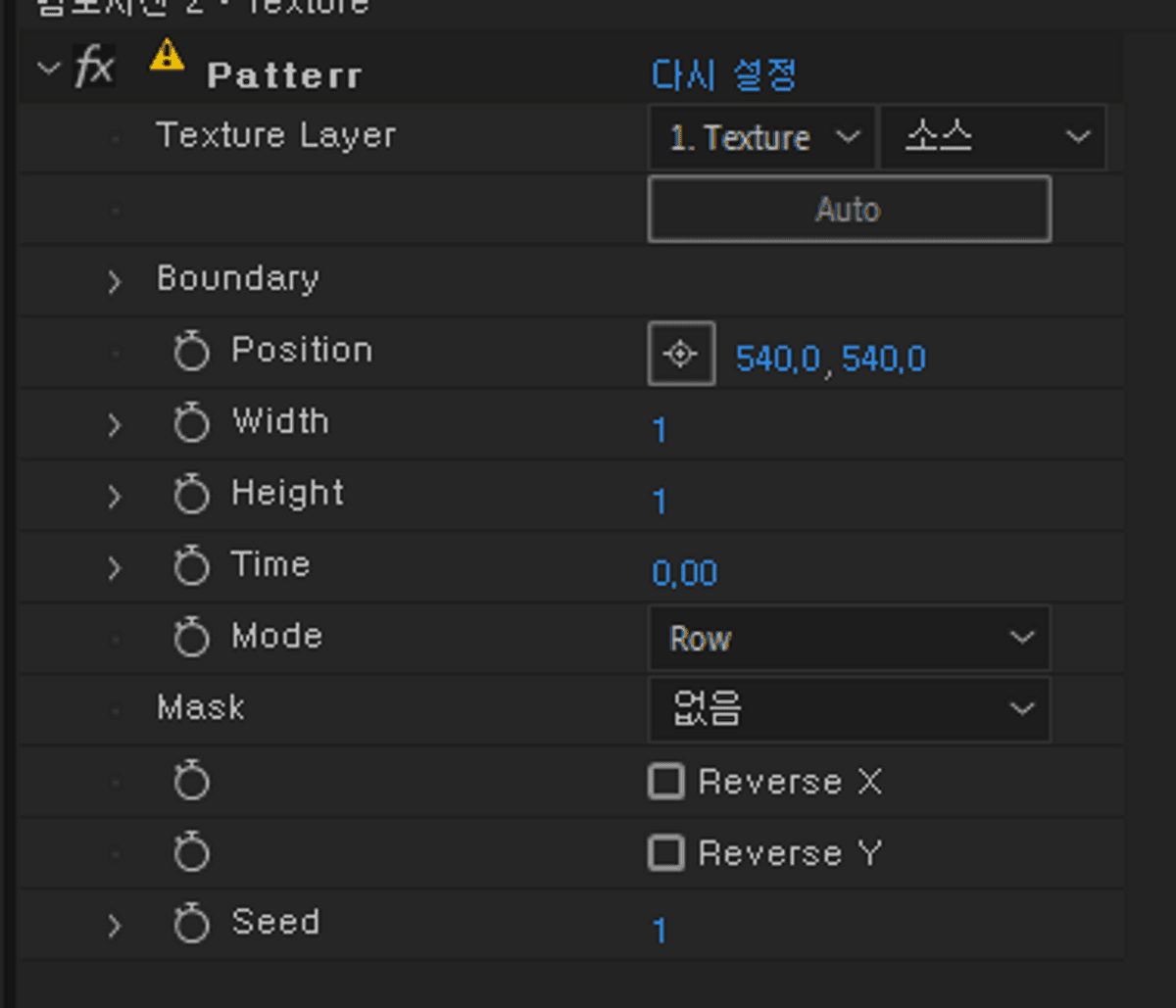
Texture Layer: Specify the texture to be repeated.
Boundary
- Start - Specify the top-left corner of the range to be repeated.
- End - Specify the bottom-right corner of the range to be repeated.
Use the Auto button to automatically set the texture range
(automatically sets the boundary to the currently visible pixel's edge).
Position - Specify the position where the pattern will be repeated.
Width - The number of horizontal repetitions.
Height - The number of vertical repetitions.
Time - Time offset. 1 represents 1 second (negative values allowed).
Mode
- Row - The time offset is applied horizontally.
- Column - The time offset is applied vertically.
- Random - The time offset is applied in a random order.
Mask - Set a mask to repeat the texture only within the mask's area.
Reverse X - Flip the pattern horizontally.
Reverse Y - Flip the pattern vertically.
Seed - Sets the seed for random mode, allowing different randomization.
Important Notes
Tested on After Effects 2024 version.
Installation
Place the Pattern.aex file in the After Effects (current version)\Support Files\Plug-ins
지정한 텍스쳐 레이어를 패턴으로 만들어주는 플러그인 입니다.
사용 방법
1. Texture Layer를 지정합니다.
2. Boundary의 start와 End로 패턴으로 만들 범위를 지정합니다.
3. Width와 Height를 사용해 반복할 개수를 정합니다.
4. 시간오프셋을 활용하거나 마스크를 지정등으로 원하는 모습으로 꾸밉니다.
기능 설명
Texture Layer - 반복할 텍스쳐를 지정합니다.
Boundary
- Start - 반복할 범위의 왼쪽 위 꼭짓점을 지정합니다.
- End - 반복할 범위의 오른쪽 아래 꼭짓점을 지정합니다.
Auto 버튼을 활용하여 텍스쳐의 범위를 자동으로 설정할 수 있습니다.
(현재 표시되는 픽셀의 경계로 범위 자동 설정)
Position - 반복되는 위치를 지정합니다.
Width - 반복되는 가로 개수입니다.
Height - 반복되는 세로 개수입니다.
Time - 시간 오프셋입니다. 1은 1초를 나타냅니다. (음수 가능)
Mode
- Row - 가로방향으로 시간 오프셋이 적용됩니다.
- Columm - 세로방향으로 시간 오프셋이 적용됩니다.
- Random - 랜덤한 순서로 시간 오프셋이 적용됩니다.
Mask - 마스크를 설정하여 마스크의 내부에만 텍스쳐가 반복됩니다.
Reverse X - 패턴을 가로 방향으로 뒤집습니다.
Reverse Y - 패턴을 세로 방향으로 뒤집습니다.
Seed - Random의 시드입니다. 랜덤을 다르게 합니다.
유의사항
After Effect 2024 버전에서 테스트 되었습니다.
적용방법
After Effects (현재 버전)\Support Files\Plug-ins 에 Pattern.aex 를 넣어주세요.
指定したテクスチャレイヤーをパターンにするプラグイン
使い方
1. Texture Layer を指定します。
2. Boundary の Start と End でパターン化する範囲を指定します。
3. Width と Height を使用して繰り返す回数を指定します。
4. 時間オフセットを利用したり、マスクを指定するなどして、好みの外観に調整します。
機能説明
Texture Layer - 繰り返すテクスチャを指定します。
Boundary
- Start - 繰り返す範囲の左上の頂点を指定します。
- End - 繰り返す範囲の右下の頂点を指定します。
Auto ボタンを使用して、テクスチャの範囲を自動設定することができます
(現在表示されているピクセルの境界に自動設定)。
Position - 繰り返される位置を指定します。
Width - 繰り返される横方向の回数です。
Height - 繰り返される縦方向の回数です。
Time - 時間オフセットです。1は1秒を表します(マイナス値も可能)。
Mode
- Row - 時間オフセットが横方向に適用されます。
- Column - 時間オフセットが縦方向に適用されます。
- Random - ランダムな順序で時間オフセットが適用されます。
Mask - マスクを設定し、マスクの内部にのみテクスチャが繰り返されます。
Reverse X - パターンを横方向に反転します。
Reverse Y - パターンを縦方向に反転します。
Seed - Random のシードです。ランダムパターンを変化させます。
注意事項
After Effects 2024 バージョンでテスト済みです。
インストール方法
After Effects(現在のバージョン)\Support Files\Plug-ins フォルダに Pattern.aex を入れてください。
Browse the other products below. English is supported.
아래의 다른 상품을 살펴보세요. 한국어를 지원합니다.
以下の他の商品をご覧ください。日本語に対応しています。
$10
$10