

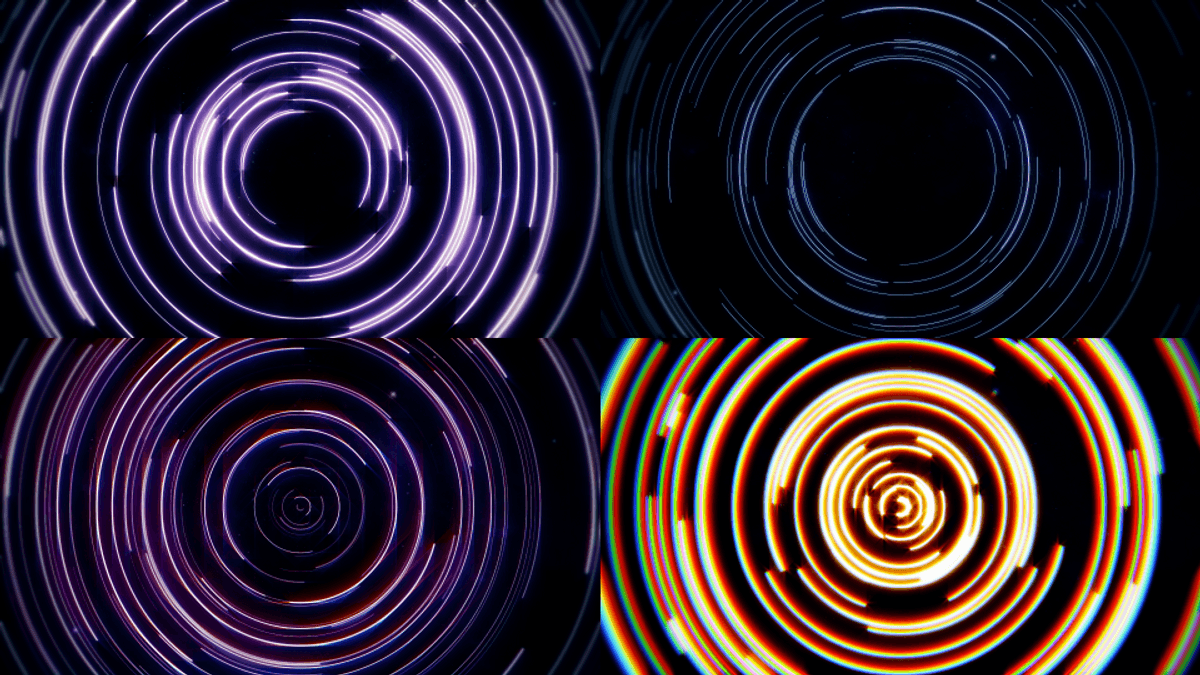
별들의 일주운동(Star Trail Motion)
$2
https://x.com/repiece_/status/1831948153555452046?s=19
Star Trail Motion Preset
How to Use
1. Create a shape layer.
2. Apply the "Star Trail Motion" effect to the layer from the Effects & Presets panel.
3. In the Shape Layer’s content, duplicate (Ctrl + D) or delete the star trails as needed.
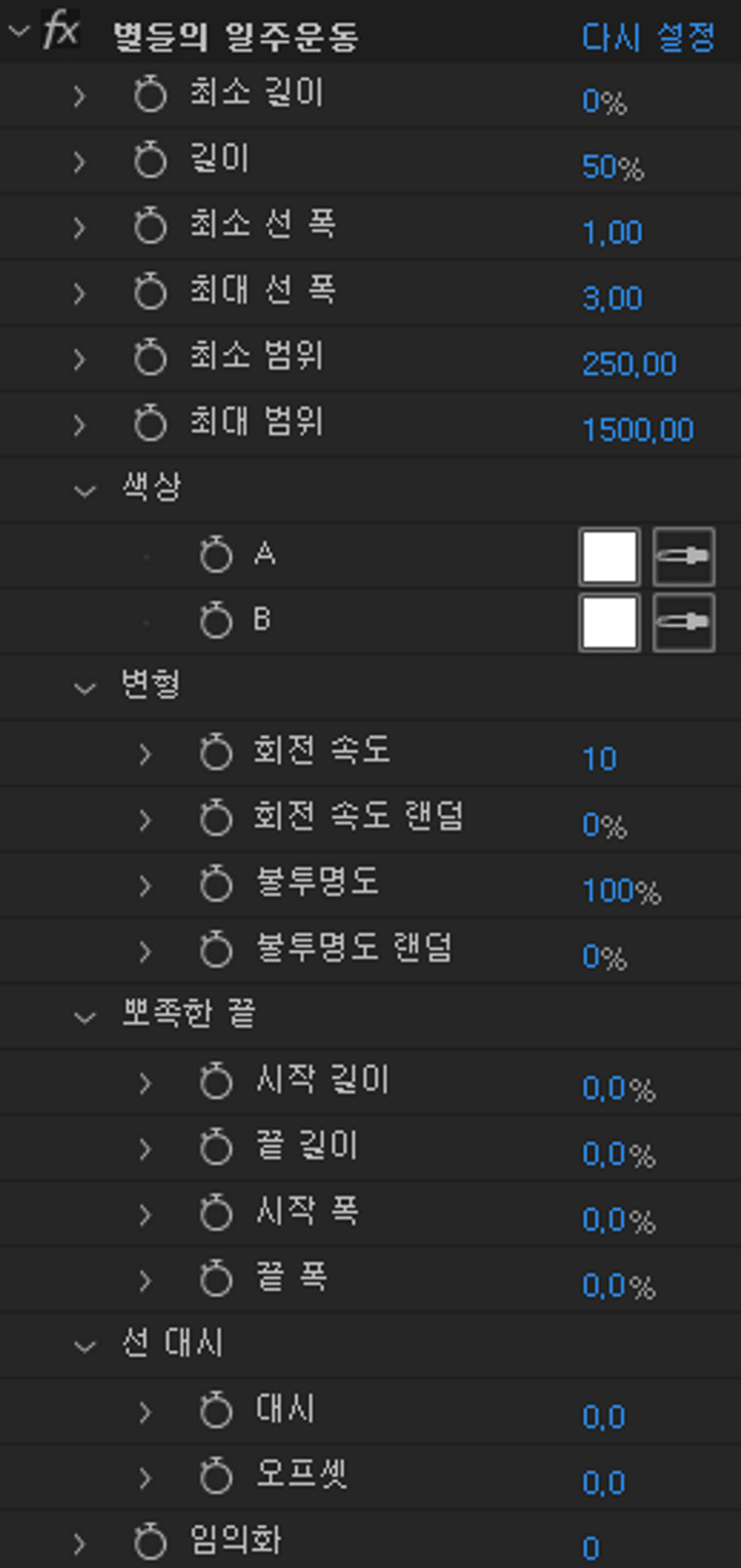
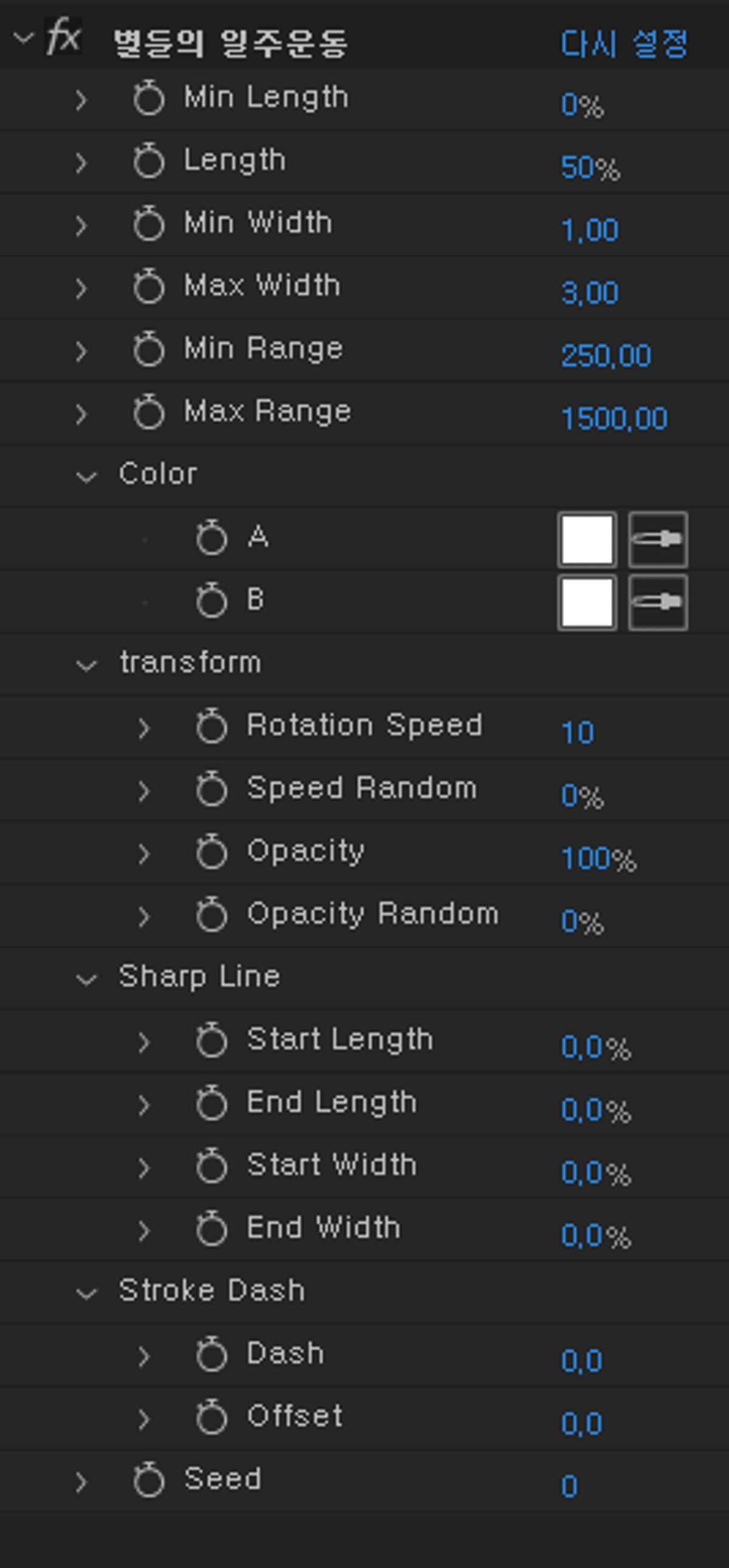
4. Adjust the 21 parameters to customize the appearance to your liking.
Feature Description
Min Length - Adjusts the minimum length of the lines.
Length - Adjusts the length of the lines.
Min Width - Adjusts the minimum thickness of the lines.
Max Width - Adjusts the maximum thickness of the lines.
Min Range - Adjusts the minimum range of the star trail motion.
Max Range - Adjusts the maximum range of the star trail motion.
Color
- A
- B
A gradient between the designated colors A and B will be applied randomly.
To use a solid color, set both A and B to the same color.
Transformation
- Rotation Speed - Adjusts the speed of the star trail motion. The rotation is clockwise, but negative values are supported (counterclockwise).
- Speed Random - Randomizes the rotation speed of individual lines.
- Opacity - Adjusts the opacity of the lines.
- Opacity Random - Randomizes the opacity of individual lines.
Sharp Line
- Start Length - Makes the start of the lines pointy.
- End Length - Makes the end of the lines pointy.
- Start Width - Adjusts the thickness at the start of the lines.
- End Width - Adjusts the thickness at the end of the lines.
Stroke Dash
- Dash - Turns the lines into dashed lines.
- Offset - Moves the dashes along the path.
Seed - This is the seed for all random values, allowing for different random effects.
Important Notes
Presets have been tested on the 2024 versions of After Effects in Korean, English, and Japanese.
Functionality on earlier versions is not guaranteed.
Installation
Place the file in the "User Presets" folder of your current After Effects version.
The English version (ER) is compatible with all language versions, while the Korean (KR) and Japanese (JP) presets must match the respective language version of After Effects.
별들의 일주운동 모습을 모양레이어로 쉽게 만들어주는 프리셋입니다.
사용 방법
1. 모양레이어를 만듭니다.
2. 효과및 사전설정 패널에서 별들의 일주운동 효과를 레이어에 적용합니다.
3. 모양레이어 안의 콘텐트에서 별들의 일주운동을 필요한 개수만큼 복제(Ctrl + D)하거나 지웁니다.
4. 21개의 파라미터를 조절하며 원하는 모습으로 꾸밉니다.
기능 설명
최소 길이 - 선의 최소길이를 조절합니다.
길이 - 선의 길이를 조절합니다.
최소 선 폭 - 선의 최소 굵기를 조절합니다.
최대 선 폭 - 선의 최대 굵기를 조절합니다.
최소 범위 - 일주운동이 생기는 최소 범위를 조절합니다.
최대 범위 - 일주운동이 생기는 최대 범위를 조절합니다.
색상
- A
- B
지정한 A와 B 사이의 그라데이션 색이 랜덤으로 적용됩니다.
단색으로 하고싶다면 동일한 색상으로 A, B를 설정하면 됩니다.
변형
- 회전 속도 - 일주운동의 속도를 조절합니다. 시계방향으로 회전하며 음수값을 지원합니다(반시계)
- 회전 속도 랜덤 - 개별적인 선들의 속도를 랜덤하게 적용합니다.
- 불투명도 - 선의 불투명도를 조절합니다.
- 불투명도 랜덤 - 개별적인 선들의 불투명도를 랜덤하게 적용합니다.
뽀쪽한 끝
- 시작 길이 - 선의 시작이 뽀쪽하게 됩니다.
- 끝 길이 - 선의 끝이 뽀쪽하게 됩니다.
- 시작 폭 - 선의 시작의 굵기를 조절합니다.
- 끝 폭 - 선의 끝의 굵기를 조절합니다.
선 대시
- 대시 - 선이 점선이 됩니다.
- 오프셋 - 점선이 움직입니다.
임의화 - 시드입니다. 모든 랜덤 값을 다르게합니다.
유의사항
After Effect 2024 한글, 영어, 일본어 버전에서 테스트 되었습니다.
그이하 버전에 작동하지 않습니다
적용방법
After Effects (현재 버전)\User Presets 에 파일을 넣으시면 됩니다.
영어버전(EU)은 모든 언어 버전에 호환되며 한국어(KR), 일본어(JP) 버전은 에프터이펙트의 언어버전하고 일치해야합니다.
星の周運動プリセット
使い方
1. シェイプレイヤーを作成します。
2.「星の周運動」エフェクトを「エフェクト&プリセット」パネルからレイヤーに適用します。
3. シェイプレイヤー内のコンテンツで、必要に応じて星の軌跡を複製(Ctrl + D)したり削除したりします。
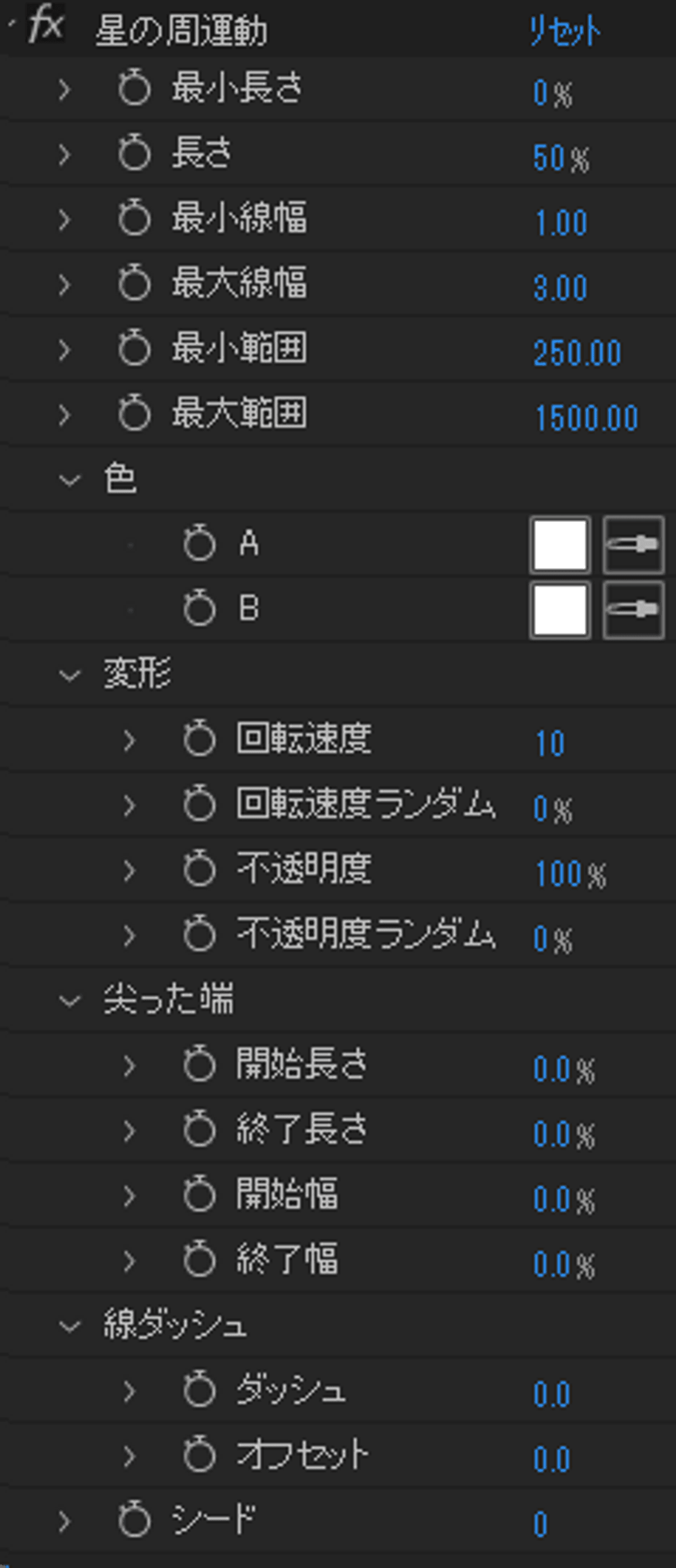
4. 21のパラメーターを調整して、お好みに合わせた外観にカスタマイズします。
機能説明
最小長さ - 線の最小長さを調整します。
長さ - 線の長さを調整します。
最小線幅 - 線の最小の太さを調整します。
最大線幅 - 線の最大の太さを調整します。
最小範囲 - 星の軌跡の最小範囲を調整します。
最大範囲 - 星の軌跡の最大範囲を調整します。
色
- A
- B
指定したAとBの間のグラデーション色がランダムに適用されます。 単色にしたい場合は、AとBを同じ色に設定してください。
変形
- 回転速度 - 星の軌跡の回転速度を調整します。回転は時計回りですが、負の値もサポートされています(反時計回り)。
- 回転速度ランダム - 各線の回転速度をランダム化します。
- 不透明度 - 線の不透明度を調整します。
- 不透明度ランダム - 各線の不透明度をランダム化します。
尖った端
- 開始長さ - 線の開始部分を尖らせます。
- 終了長さ - 線の終了部分を尖らせます。
- 開始幅 - 線の開始部分の太さを調整します。
- 終了幅 - 線の終了部分の太さを調整します。
線ダッシュ
- ダッシュ - 線を点線にします。
- オフセット - 点線をパスに沿って移動させます。
シード - すべてのランダム値のシードで、異なるランダム効果を実現します。
注意事項
After Effects 2024の韓国語、英語、日本語バージョンでテストされています。
それ以前のバージョンでの動作は保証されません。
インストール方法
ファイルを現在のAfter Effectsバージョンの「User Presets」フォルダーに置いてください。
英語バージョン(EU)はすべての言語バージョンと互換性がありますが、韓国語(KR)および日本語(JP)バージョンのプリセットは、それぞれのAfter Effectsの言語バージョンに一致する必要があります。
Browse the other products below. English is supported.
아래의 다른 상품을 살펴보세요. 한국어를 지원합니다.
以下の他の商品をご覧ください。日本語に対応しています。
$2
$2