

RepeaterMaster
$15
20 people bought this
Using the repeater function in After Effects in a unique way, RepeaterMaster
This tool separates the 'repeater' function of shape layers into individual layers.
It offers various features to assist in animation work by controlling the separated layers.
Key Features
1. Create a shape layer.
2. Use the 'add-repeater' function to style the shape layer.
3. Press the generate button.
Feature Descriptions
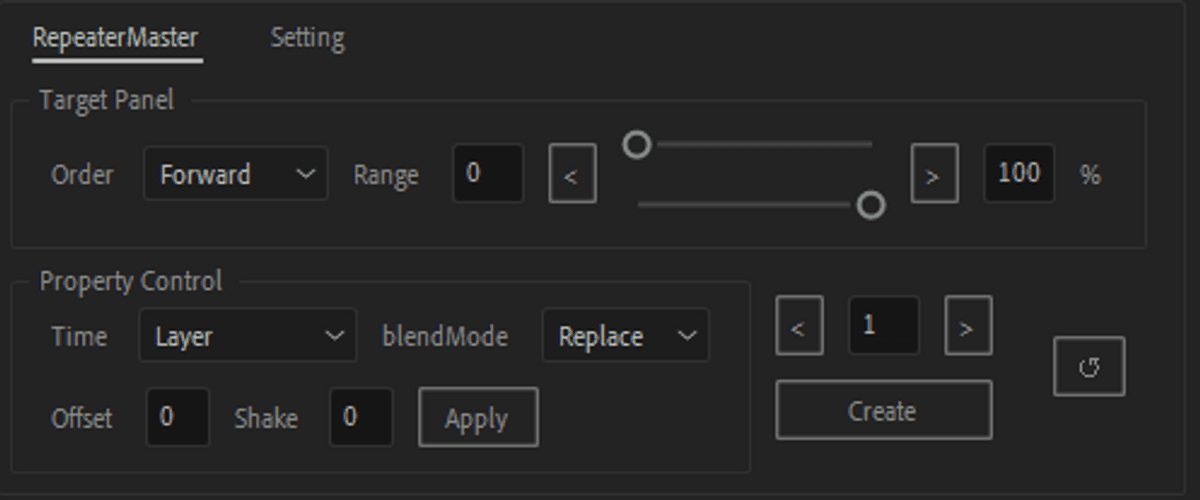
Target -Specifies the criteria for applying additional effects.
Order -Determines the order of the target.
- Forward
- Reverse
- Random
Range -Sets the minimum and maximum range to limit the target.
Attribute Control -A function that applies keyframes of selected attributes (position, scale, rotation, etc.) uniformly to the repeated shape layers.
*Selected layers must have the same hierarchy to be recognized.
Time -Sets the timing method for keyframes.
- Layer: Changes dynamically at the start point of the layer.
- Composition: Based on the time of the composition.
Blend Mode -Specifies how to handle keyframes when applying them uniformly.
- Replace: Removes existing keyframes.
- Add: Keeps existing keyframes.
Offset -Offsets the keyframe timing in sequence.
Shake -Randomly moves the keyframe timing to a predetermined maximum value.
(*Attribute control supports multi-attribute selection and responds to dimension separation, etc.)
Other Features
Settings for fixed seed, renaming, and other less frequently used features are separated out.
Notes
It is not suitable for use with excessive keyframe animations involving hundreds of layers.
*Attribute control can be applied to less than 300 layers per second.
(Performance may vary depending on the computer's capabilities.)
Due to After Effects' system limitations, manipulating a large number of layers simultaneously can be burdensome for the system.
For cases where hundreds to thousands of identical shapes need animation, using technologies like form or particular to manage within a single layer is better for performance.
How to Apply
Place the file in the following directory: Adobe After Effects (current version)\Support Files\Scripts\ScriptUI Panels
In After Effects, go to Window -> scroll down and click RepeaterMaster.
You can change the language settings in the Settings. - (US, KR, JP)
에프터이펙트의 반복기능을 색 다르게 쓸 수 있는 RepeaterMaster
모양레이어의 기능'반복'을 개별적인 레이어로 분리해줍니다.
분리된 레이어를 컨트롤하여 애니메이션 작업을 보조하는 여러 가지 기능이 있습니다.
영상에 모든 기능을 담기에는 시간이 길어져서
딱 3분을 투자해도 아깝지 않은 기능
핵심 기능
1. 모양레이어를 만든다.
2. 모양레이어에 추가-반복을 활용하여 꾸며준다.
3. 생성 버튼을 누른다.
기능 설명
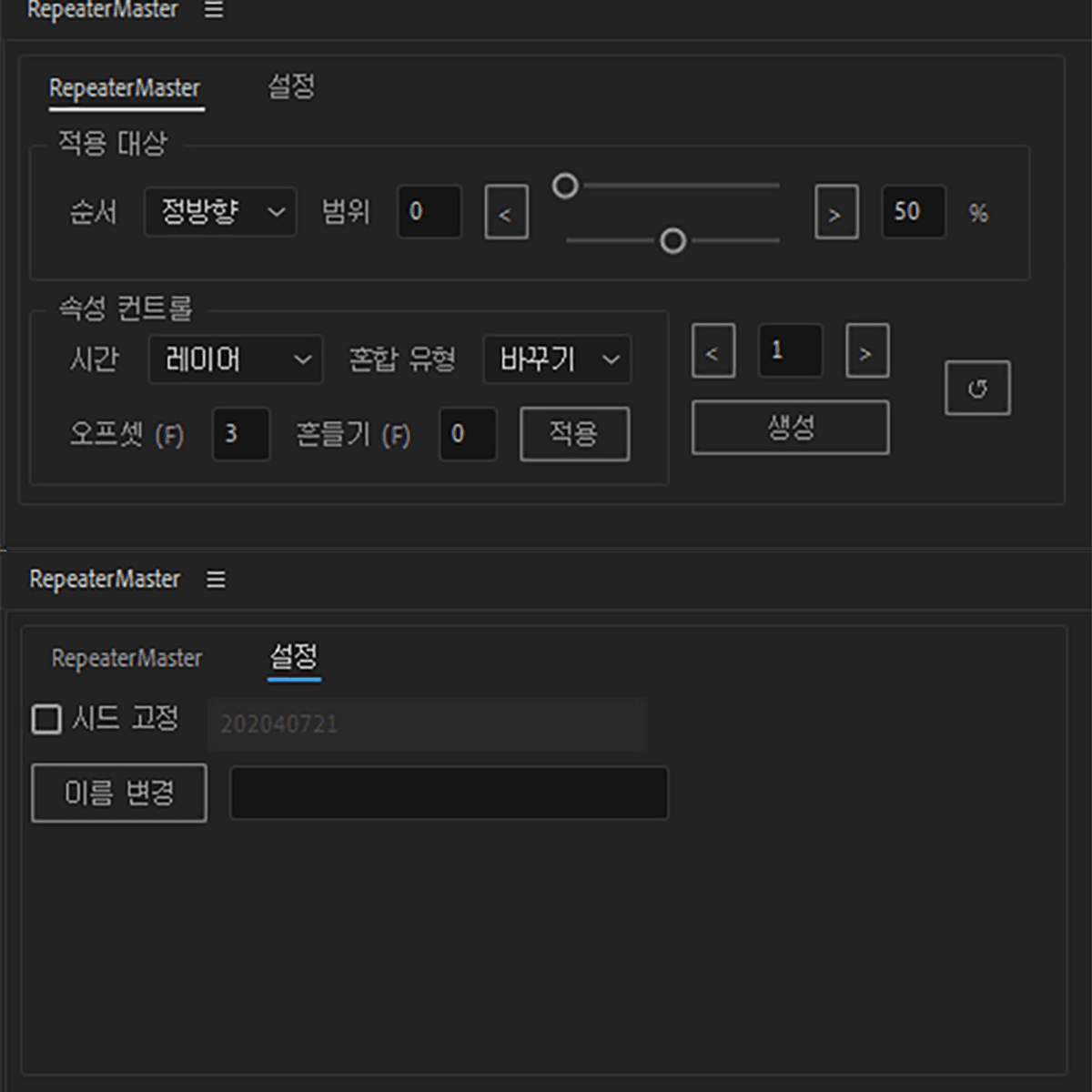
적용 대상 - 부가적인 효과들이 적용되는 기준
순서 - 적용대상의 순서를 정합니다.
- 정방향
- 역방향
- 랜덤
범위 - 최소와 최대 범위를 설정하여 적용할 대상을 제한합니다.
속성 컨트롤 - 선택된 속성(위치, 비율, 회전 등)의 키프레임을 일괄적으로 반복 모양레이어에 적용하는 기능
*선택된 레이어와 계층 구조가 동일해야지 인식됩니다.
시간 - 키프레임의 시간방식을 설정합니다.
- 레이어 - 레이어의 시작지점에 유동적으로 바뀐다.
- 컴포지션 - 컴포지션의 시간을 기준으로 한다.
혼합유형 - 키프레임을 일괄적으로 적용할때 키프레임에 대한 처리방식
- 바꾸기 - 기존 키프레임은 제거된다.
- 추가 - 기존 키프레임을 유지한다.
오프셋 - 키프레임의 시간을 순서에 맞게 오프셋 합니다.
흔들기 - 키프레임의 시간을 정해진 값을 최대값으로 랜덤하게 이동시킵니다.
(속성 컨트롤은 다중 속성 선택 적용을 지원합니다. 차원분리등에도 대응)
그외 여러가지 기능
설정에서 시드고정과 이름 변경등 자주 쓰이지 않을거같은 기능은 따로 빼놓았습니다.
유의사항
수백 개의 과도한 키프레임 애니메이션을 넣는 용도로 쓰기에는 부적절합니다.
*100개 미만의 레이어가 초 단위로 속성 컨트롤 적용을 가능합니다.
(컴퓨터 성능에 따라서 차이를 보일 수 있습니다.)
에프터이펙트 시스템상 대량의 레이어를 한꺼번에 조작하는 거는 시스템의 부담이 큽니다.
수백에서 수천가지의 동일한 모양에 애니메이션이 들어가야 하는 경우 form, particular 등의 기술로 하나의 레이어에 관리하는 게 성능 면에서 좋습니다.
적용방법
Adobe After Effects (현재버전)\Support Files\Scripts\ScriptUI Panels 에 파일을 넣으시면 됩니다.
에프터이펙트 -> 창(window) -> 스크롤 내려서 RepeaterMaster 클릭
설정에서 언어설정을 바꿀 수 있습니다. - (US, KR, JP)
After Effectsのリピータ機能をユニークに活用する RepeaterMaster
このツールは、シェイプレイヤーの「リピータ」機能を個別のレイヤーに分割します。分割されたレイヤーを制御することで、アニメーション作業をサポートするさまざまな機能を提供します。
主な機能
1. シェイプレイヤーを作成します。
2.「追加-リピータ」機能を使用してシェイプレイヤーにスタイルを適用します。
3.「生成」ボタンを押します。
機能説明
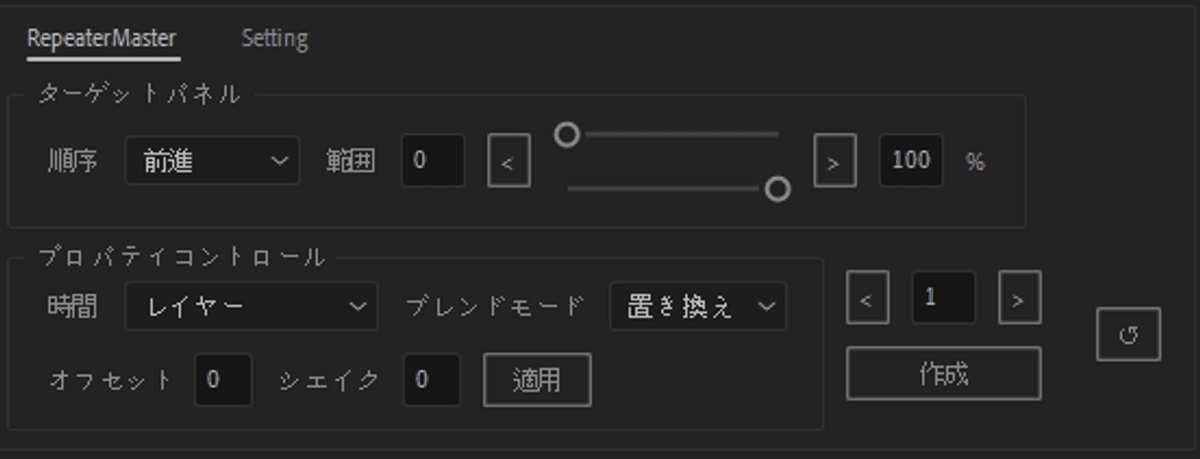
ターゲット - 追加効果を適用する基準を指定します。
順序 - ターゲットの順序を決定します。
- 前進
- 後退
- ランダム
範囲 - ターゲットを制限するための最小値と最大値の範囲を設定します。
属性コントロール - 選択した属性(位置、スケール、回転など)のキーフレームを均等にリピータシェイプレイヤーに適用する機能です。
*選択されたレイヤーは、同じ階層構造でなければ認識されません。
時間 - キーフレームの時間方式を設定します。
- レイヤー: レイヤーの開始点で動的に変更します。
- コンポジション: コンポジションの時間を基準にします。
ブレンドモード - キーフレームを均等に適用する際の処理方法を指定します。
- 置き換え: 既存のキーフレームを削除します。
- 追加: 既存のキーフレームを保持します。
オフセット - キーフレームのタイミングを順序に従ってオフセットします。
シェイク - キーフレームのタイミングを予め決められた最大値までランダムに移動させます。
(属性コントロールは複数属性の選択適用をサポートし、次元分離にも対応しています。)
その他の機能
固定シード、名前変更などのあまり使用されない機能は、別に分けて設定しています。
注意事項
数百個の過剰なキーフレームアニメーションに使用するには適していません。 *属性コントロールは、1秒あたり300レイヤー未満に適用できます。 (パフォーマンスはコンピュータの性能によって異なる場合があります。) After Effectsのシステム制限により、大量のレイヤーを一度に操作することはシステムに負担をかける可能性があります。 数百から数千の同一形状にアニメーションを適用する場合、1レイヤーで管理するためにFormやParticularなどの技術を使用する方が性能面で良いです。
適用方法
ファイルを次のディレクトリに置きます: Adobe After Effects (現在のバージョン)\Support Files\Scripts\ScriptUI Panels
After Effectsで、ウィンドウ -> スクロールして RepeaterMaster をクリックします。
設定で言語設定を変更できます。 - (US, KR, JP)
Browse the other products below. English is supported.
아래의 다른 상품을 살펴보세요. 한국어를 지원합니다.
以下の他の商品をご覧ください。日本語に対応しています。
$15
20 people bought this
Enter a fair price
$
$15