

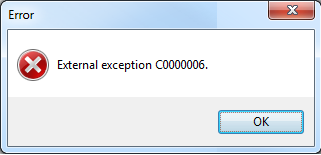
In this article, I will discuss the error known as External Exception, associated with the code C0000006 (0xc0000006). This error is a generic indication that obscures the underlying “low-level error” related to the resource (file) the operating system is attempting to load from the network.
This issue is typically reported by users of Delphi applications operating within a Windows Terminal Server environment.
In my experience, the following solution effectively addressed the issue: Adding the PE flag IMAGEFILENETRUNFROM_SWAP to all Delphi packages and projects (dpk, dpr, etc.) involved in the application.
I would like to draw your attention to two key details: the first pertains to the drag-and-drop functionality of Delphi projects with PE flags into a project group, and the second relates to third-party modules (BPL) utilized by the application.
Drag-and-Drop of Delphi Projects into a Project Group
We observed a problem that arises when Delphi packages (DPKs) containing PE flags are added to a Delphi project group via drag-and-drop. In such cases, the local path of Winapi.Windows.pas (C:\Program Files (x86)\Embarcadero\…) may inadvertently be included in the DPROJ file. If the project is saved, this path will also be added to the DPK file. To prevent this issue, it is essential to activate the PE flag using an alternative method than previously described. The key is to use the value $0800 instead of the constant name IMAGEFILENETRUNFROM_SWAP, as illustrated in the following code snippet:
```pascal
{$SetPEFlags $0800}
```
While this method of using the PE flags directive may not be as intuitive as employing the constant IMAGEFILENETRUNFROM_SWAP, it is more comprehensible for the Delphi IDE and does not necessitate the inclusion of Winapi.Windows.pas in the contains section of the project.
To rectify projects where this issue has already occurred, it is necessary to open the DPROJ and DPK project files and remove the following line:
```xml
CCReference Include="C:\Program Files (x86)\Embarcadero\Rad Studio\10.0\source\rtl\win\Winapi.Windows.pas"/>
```
Third-Party Modules (BPL)
In a case involving a customer where the compilation directive was applied across all application modules, the error persisted. This prompted us to investigate whether the issue stemmed from external modules (not compiled by us) that lacked the IMAGEFILENETRUNFROMSWAP flag. To address this, we considered utilizing the EDITBIN tool, which allows for the modification of files such as BPLs and EXEs to add various options, including /SWAPRUN: NET (corresponding to the IMAGEFILENETRUNFROMSWAP directive), without the need for recompilation. Furthermore, we determined it would be prudent to apply EDITBIN not only to external BPLs and EXEs but also to Delphi's own modules (rtl, vcl, etc.).
Currently, we have successfully installed the modules modified with EDITBIN at two customer sites, and the external exception appears to be permanently resolved.