

In my video about setting up a Pi NAS (available first to members on 2/23/2025), I mentioned I created a script that could turn USB fans on and off based on the temperature of the hard drives. Here are the steps:
1) Log into the Pi through SSH to set up the USB controller:
Install this as it is a prerequisite for uhubctl:
sudo apt install libusb-1.0-0-dev
2) Then install uhubctl, a utility that can control the power output of your USB ports
This code will download the utility, move to the correct folder, and get it ready to be installed.
git clone https://github.com/mvp/uhubctl
cd uhubctl
make
Then this code to install it:
sudo make install
3) Change the directory back to the home directory
cd ..
4) Optional Step – Plug in the fans and see if the fans turn off and on:
Check if USB turns off
sudo uhubctl -l 2 -a 0
sudo uhubctl -l 4 -a 0
Check if USB turns on
sudo uhubctl -l 2 -a 1 on 1>&-
sudo uhubctl -l 4 -a 1 off 1>&-
5) Create a bash script and edit it in the terminal
This command creates the file automatically and uses the nano editor to open it up where you can modify it (you may need to install nano if you haven't already, but I think it is preinstalled):
sudo nano fan.sh
6) Create the Script by copying and pasting into the terminal running nano:
#!/bin/bash
#
# Make sure USB is on Check the Pi temperature and turn on fan if too high, turn off if low
#
uhubctl -l 2 -a 1
uhubctl -l 4 -a 1
tlim_high="40.0" # Temperature to turn fan ON
tlim_low="35.0" # Temperature to turn fan OFF
fan_state=1 # Tracks the fan state: 0 = off, 1 = on
while :;
do
# Measure the current temperature
tnow=$(smartctl -a /dev/sda | grep "Temperature" | sed -n 's/.- \([0-9]\+\).*/\1/p;q'
)
echo "$tnow"
if (( $(echo "$tnow > $tlim_high" | bc -l) )) && [ "$fan_state" -eq 0 ] ; then
# If temp exceeds high limit and fan is off, turn on
uhubctl -l 2 -a 1
uhubctl -l 4 -a 1
fan_state=1
echo "Fan turned ON at temperature: $tnow"
elif (( $(echo "$tnow < $tlim_low" | bc -l) )) && [ "$fan_state" -eq 1 ]; then
# If temp drops below low limit and fan is on, turn it off
uhubctl -l 2 -a 0
uhubctl -l 4 -a 0
fan_state=0
echo "Fan turned OFF at temperature: $tnow"
fi
sleep 10
done
Note: BuyMeACoffee automatically changed some of this script, replacing underscores with italics. I think I fixed all of them, but if it doesn't work, let me know. Here are screen shots of the code just in case something didn't copy and paste correctly:
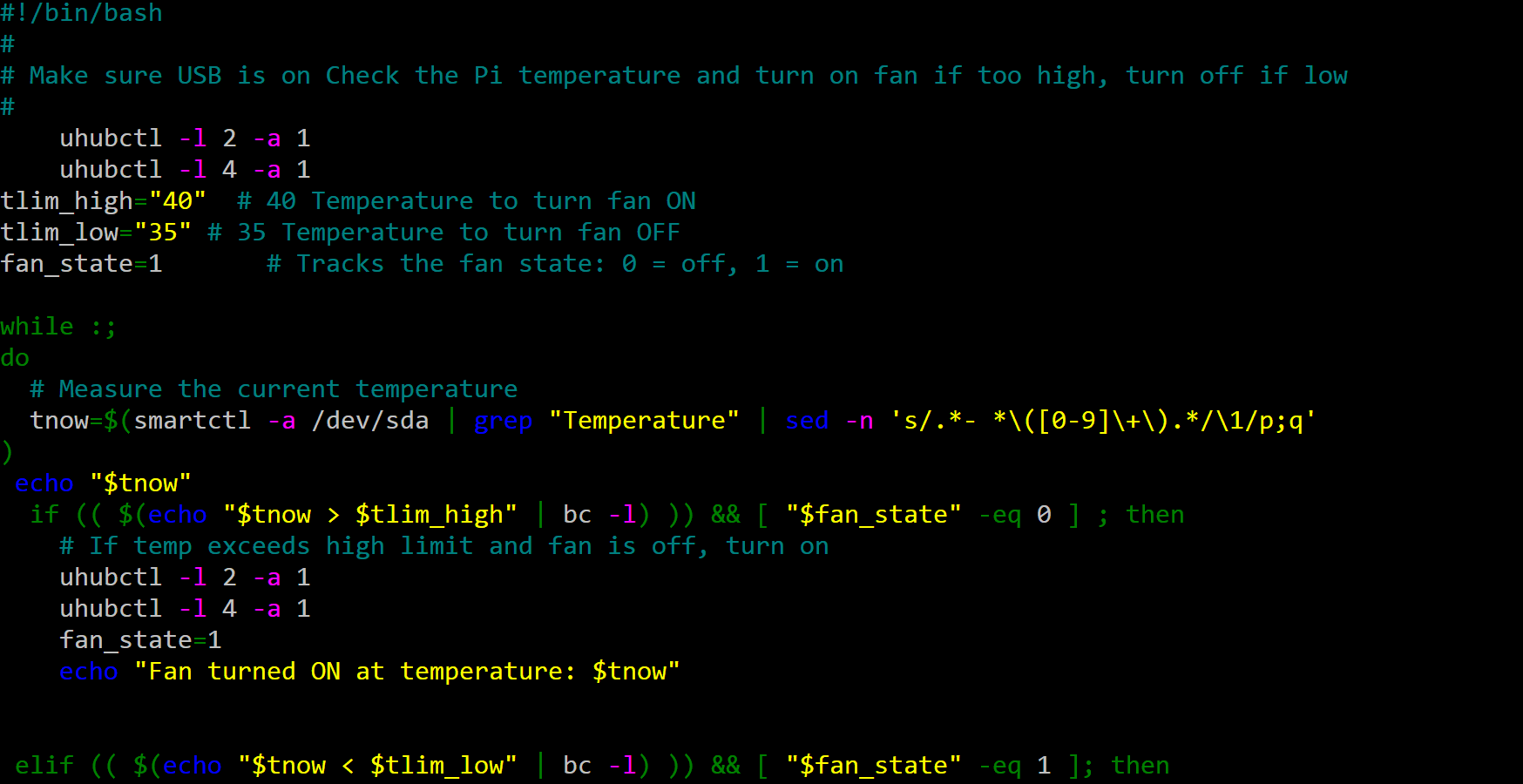
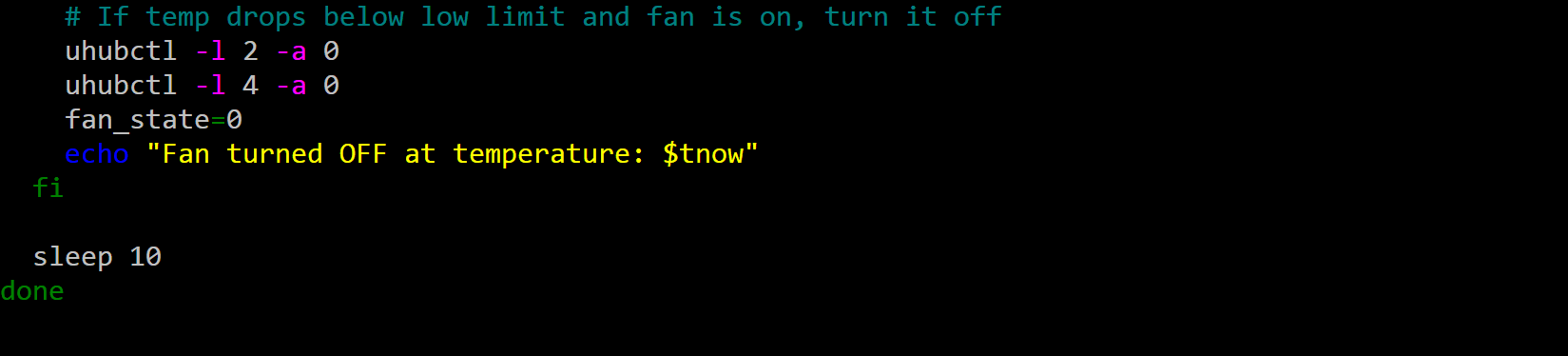
Then click "Control X" to save and exit.
7) Turn the script into an actual bash script:
sudo chmod +x fan.sh
8) Get the script to run at startup using cron or systemctl. I chose cron
sudo crontab -e
At the bottom of the file add:
@reboot sleep 60; sudo /home/PiNas5/fan.sh &
IT should look like this:
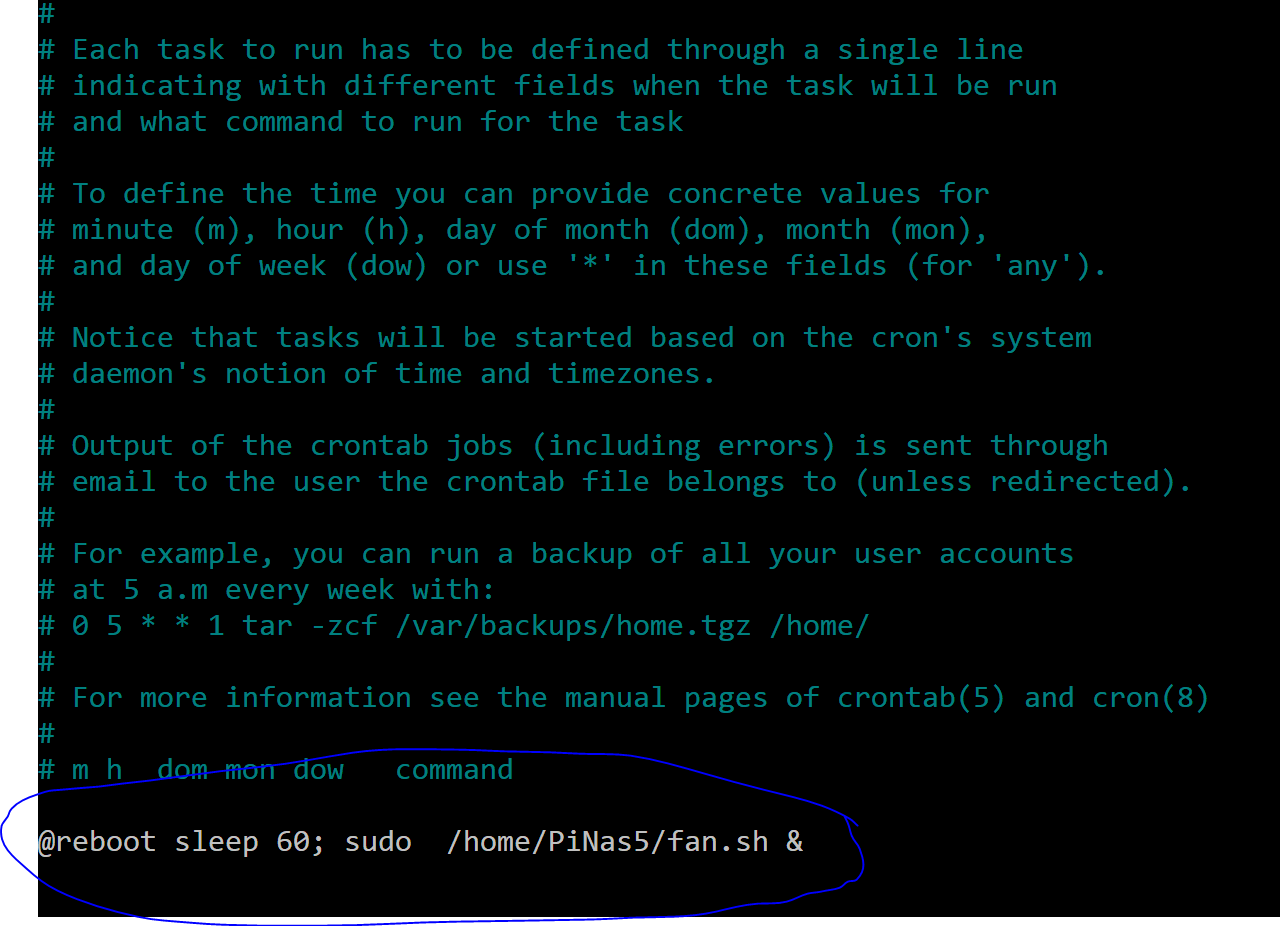
Press Control + X to save and exit. This will make the script start running 60 seconds after the Pi boots.
And that's it! :)