
I've made some updates to my spreadsheet that I think make it more helpful and provide new insights.
First, I added cells that show how much you earn vs how much Zazzle earns, as percents of total order price customer actually paid. Check out this post here for why these percents are so interesting to think about.
Second, I brought back a page where you can compare two scenarios side-by-side when deciding what rate to set. I had this in my original spreadsheet but neglected to include this helpful comparison view in my post-April 1st version.
This new version has three "pages" to it. They are actually three separate sheets you will see as tabs at bottom left of sheet. The tabs are 'Old vs New", "Compare 2", and "4 rates".
Old vs New lets you compare what you will earn now vs what you would have earned under the old pre-Ambassador Program terms. Enter your royalty percent, the resulting list price for the product, and an optional quantity and discount on the Ambassador Program side of the sheet. Everything else will be calculated for you so you can instantly see all the numbers both new way and old way.
Here's what this sheet looks like. (I put a red dot on the 6 fields you can change. Everything else is locked and calculated for you.)
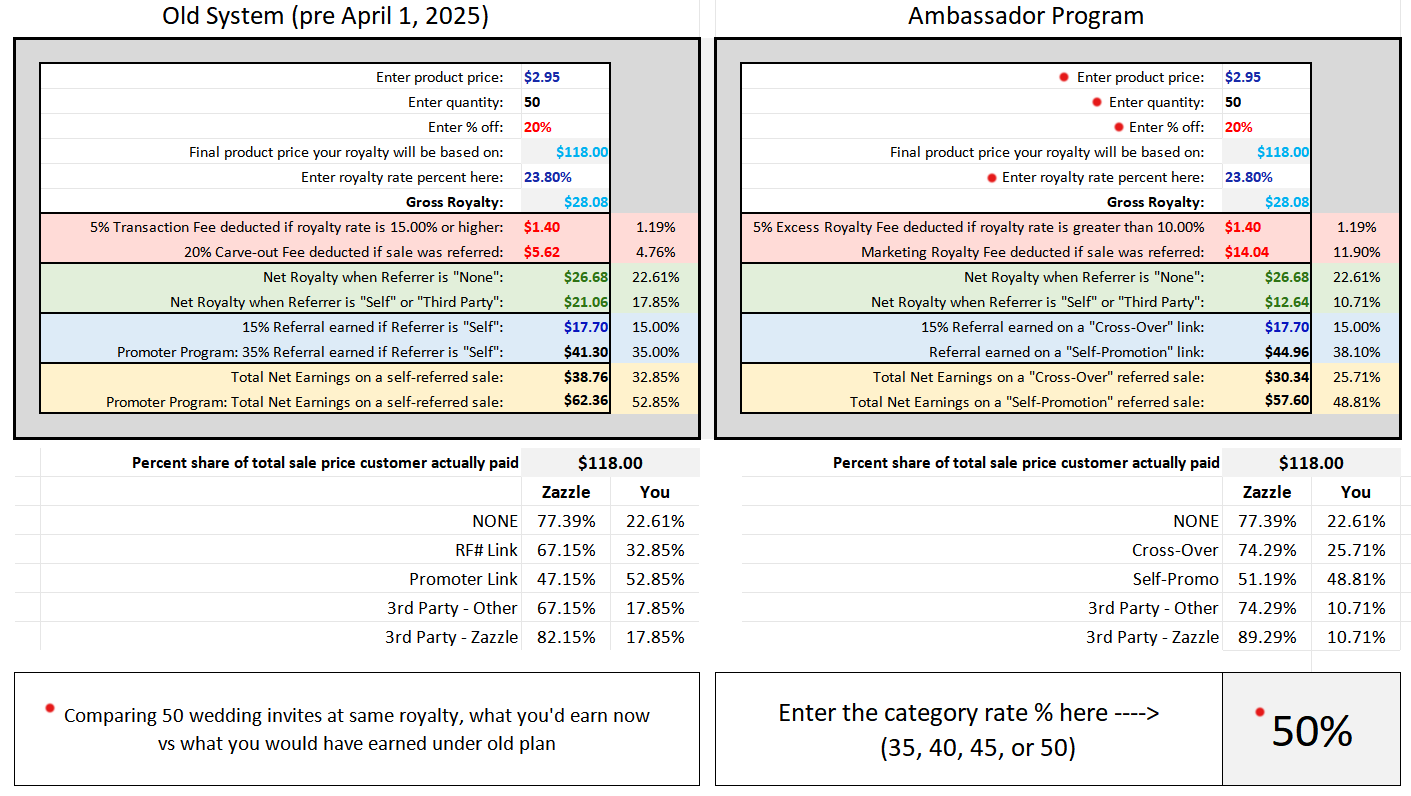 All of the percents shown are percents of total sale price customer paid which is Line 6, "Final product price your royalty will be based on". So here we can see for example that the Transaction Fee / Excessive Royalty Fee equals 1.19% of the $118.00 the customer paid and that total earnings on a None sale ($26.68) equal 22.61% of the $118.00 the customer paid.
The percentages listed at the bottom are the five different sale types I talked about here.
Zazzle + You will equal 100% of the total sale.
For 3rd Party - Other it will equal 85% of the total sale. This because the 3rd Party affiliate gets the other 15%.
Compare 2 gives you two calculators side-by-side so you can easily compare the effects of two different royalty rates on same product or two different discount amounts or bulk sale vs just one.
Here I am comparing same bulk sale of 50 wedding invites at 10% vs 23.8%.
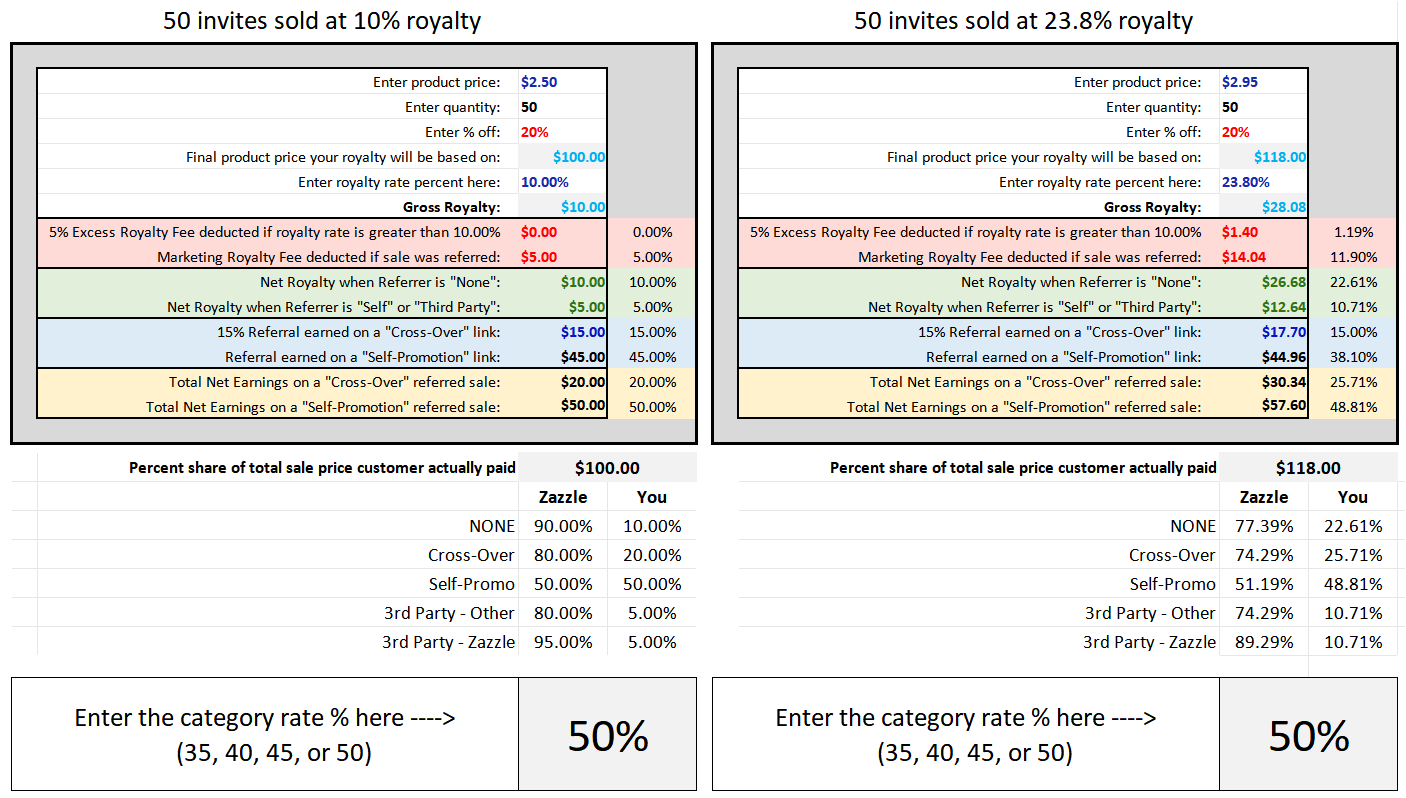 Here you can again see the total the customer paid ($100 or $118) broken down into what percent of the total sale you earn vs what Zazzle earns on it. The top text row is editable so you can note whatever it is you're comparing.
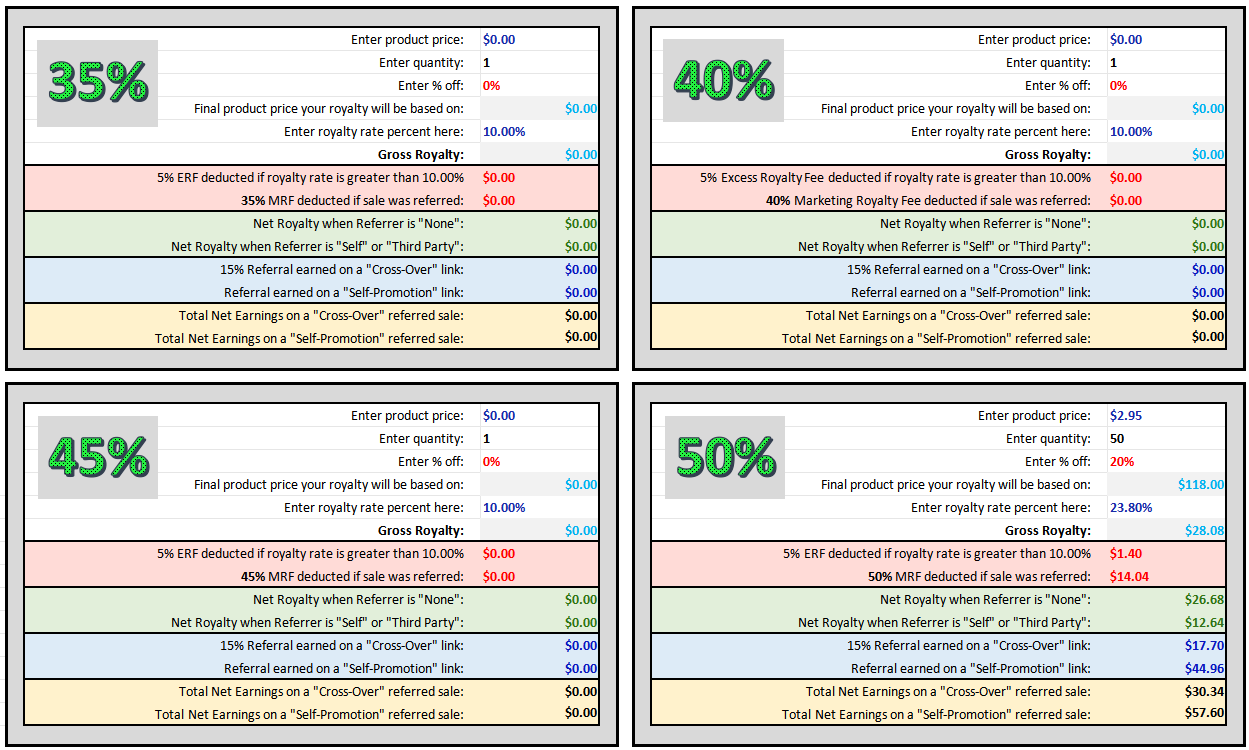
4 Rates is same as it was before. This is a grid of four calculators, one at each of the possible rates (35, 40, 45, or 50). If you're not sure which category your product was assessed at, you can enter the "subtotal" and royalty rate as they appear on your Royalty History in each of the four calcs (leaving the discount and quantity fields at 0) and see which one matches the earnings shown on your report.
 Due to rounding differences, my numbers are sometimes off by a penny compared to what you see on your Zazzle reports. Likewise, this is why the total you see on your main Royalty History report is sometimes a penny less than what you see when clicking the eye icon for the detailed report.
(*I believe that a Zazzle forum Mod did confirm that the amount shown under the detailed eye-icon report that is often a penny higher is what you are actually credited as earning.)
So that's my updated sheet. I hope it is as helpful and eye-opening to you as it is for me. It is completely FREE to download from my own website, NO strings attached. But if you feel inclined to buy me a cup of coffee I won't protest. ;)
Here's the link to download it:
https://colscreations.com/SharedFiles/UPDATED_AP_EarnigsCalc.xlsx
~ Col's Creations
September 30, 2025