
🔒 API Documentation Security Enhancements
This release adds authentication capabilities to the AtlasServer API documentation, allowing administrators to secure access to Swagger UI and ReDoc interfaces.
New Features
- Protected API Documentation: Administrators can now enable authentication for Swagger UI and ReDoc interfaces
- Flexible Authentication Options:
- Use existing administrator credentials
- Configure custom username/password specifically for documentation access
- Integrated Security Controls: All authentication settings are easily configurable through the AtlasServer admin panel
How to Use
1. Access the Settings panel in AtlasServer
2. Navigate to the "API Documentation Security" section
3. Toggle "Protect API documentation" to enable or disable authentication
4. Choose between administrator credentials or custom credentials
5. If using custom credentials, enter your desired username and password
6. Save settings
Screenshot
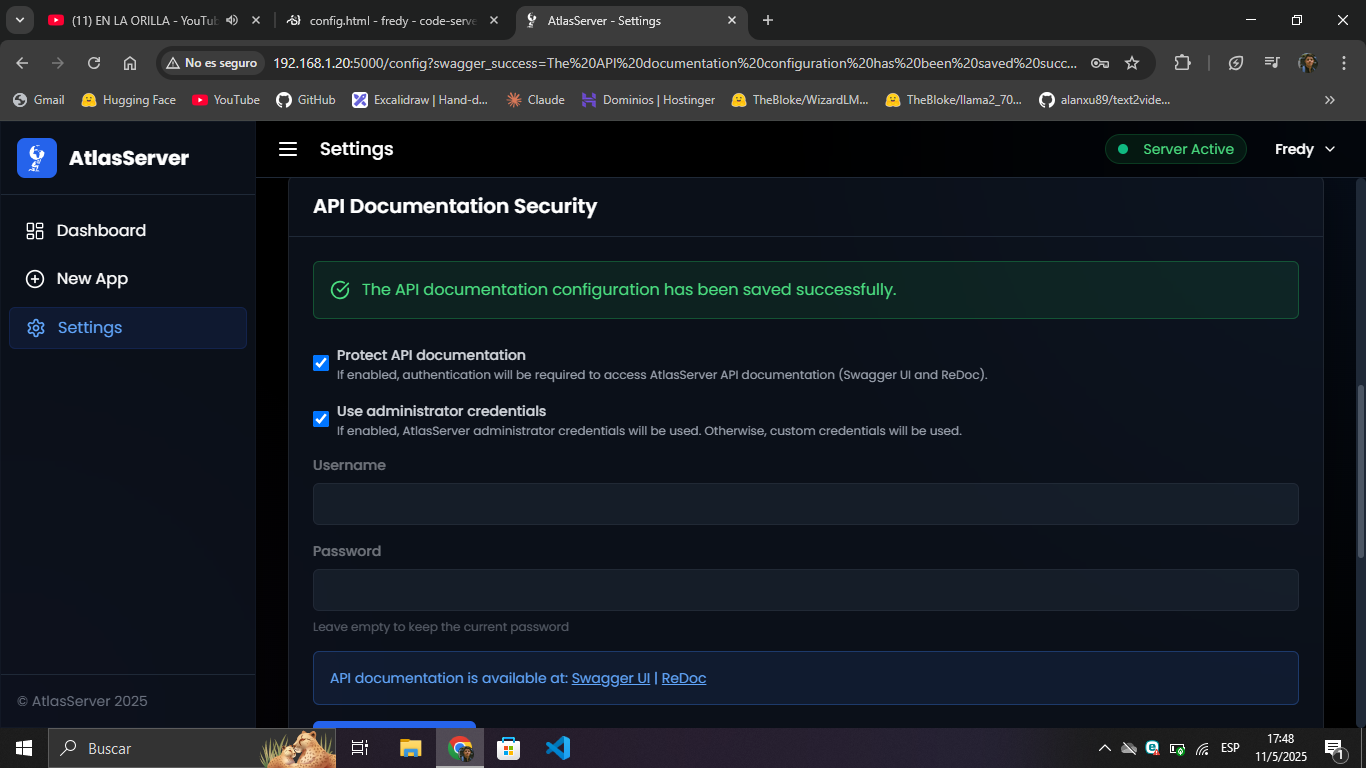
The new API Documentation Security settings panel in AtlasServer allows administrators to configure access controls for Swagger UI and ReDoc interfaces.
Technical Details
- Implements secure HTTP Basic Authentication for /docs and /redoc routes
- Password comparison uses secure cryptographic comparison functions to prevent timing attacks
- Compatible with all modern browsers that support HTTP Basic Auth
Updates
- Added new configuration storage system for Swagger authentication settings
- Updated documentation to reflect new security features
- Added security validation for API documentation routes
Requirements
This update requires no additional dependencies and is compatible with all existing AtlasServer deployments.
GitHub: https://github.com/AtlasServer-Core/AtlasServer-Core